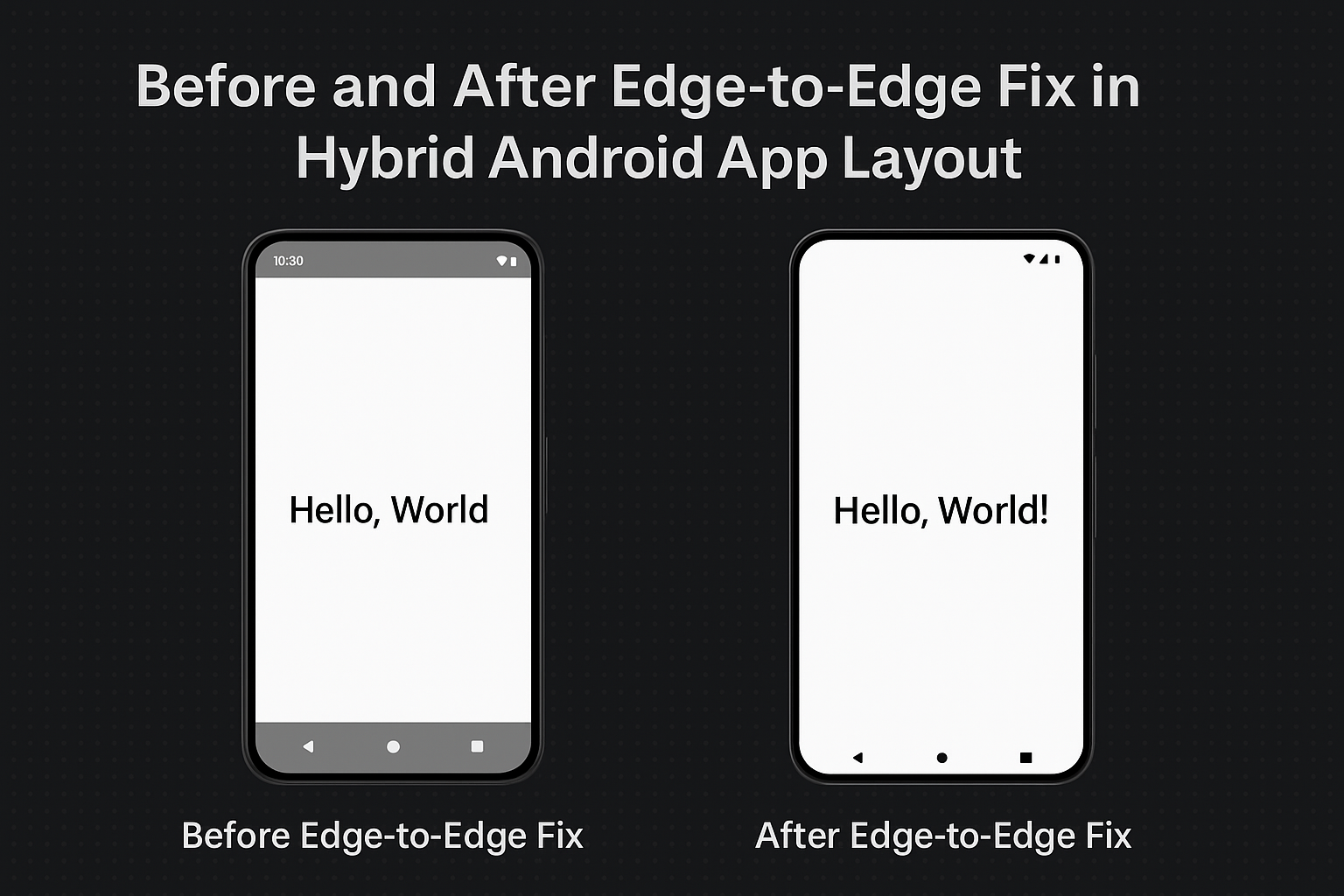
Fixing Edge-to-Edge Issues in Hybrid Android Apps (Android 15+)

Author: Jat

If you’ve updated your hybrid app to target Android 15 (API 34) and noticed broken layouts, cut-off content, or overlapping UI — you’re not alone.

Android is evolving to embrace immersive, edge-to-edge design. But hybrid apps built using Capacitor, Cordova, or Ionic often break because they rely on WebView, which doesn’t automatically adapt to system gesture insets or modern screen shapes.

🌐 What is Edge-to-Edge UI?

Edge-to-edge layout means your app’s content extends beneath the status bar, navigation bar, and gesture areas — using every available pixel.

Android encourages this layout to support:

  • Immersive design on full-screen devices
  • Compatibility with gesture navigation
  • Maximum space usage on notch, punch-hole, and curved displays

Read the official Android Edge-to-Edge Design Guide.

🎯 Why Was It Introduced?

  1. Maximize screen real estate — avoid wasting space on top/bottom bars.
  2. Gesture navigation compatibility — gestures now replace buttons.
  3. Modern UX standards — aligned with Google’s Material You design language.
  4. Cross-device consistency — Pixel, Samsung, OnePlus now follow Android’s rules.

💥 Why Hybrid Apps Break

Hybrid apps rely on WebView, which doesn’t adapt automatically to insets. The result?

  • Content may get hidden behind the system UI
  • Safe areas are ignored unless manually defined
  • CSS-only solutions fail unless the native layer is configured correctly

🛠 How to Fix Edge-to-Edge in Hybrid Apps

✅ 1. Set Target SDK to 34

compileSdkVersion 34
targetSdkVersion 34

✅ 2. Update Native Code for Insets

In MainActivity.java or MainActivity.kt:Java:

if (Build.VERSION.SDK_INT >= Build.VERSION_CODES.R) {
  getWindow().setDecorFitsSystemWindows(false);
} else {
  getWindow().getDecorView().setSystemUiVisibility(
    View.SYSTEM_UI_FLAG_LAYOUT_STABLE |
    View.SYSTEM_UI_FLAG_LAYOUT_FULLSCREEN |
    View.SYSTEM_UI_FLAG_LAYOUT_HIDE_NAVIGATION
  );
}

Kotlin:

if (Build.VERSION.SDK_INT >= Build.VERSION_CODES.R) {
  window.setDecorFitsSystemWindows(false)
} else {
  window.decorView.systemUiVisibility = (
    View.SYSTEM_UI_FLAG_LAYOUT_STABLE or
    View.SYSTEM_UI_FLAG_LAYOUT_FULLSCREEN or
    View.SYSTEM_UI_FLAG_LAYOUT_HIDE_NAVIGATION
  )
}

✅ 3. Make System Bars Transparent

In styles.xml:

<item name="android:statusBarColor">@android:color/transparent</item>
<item name="android:navigationBarColor">@android:color/transparent</item>

✅ 4. Handle Safe Areas in CSS

html, body {
  padding-top: env(safe-area-inset-top);
  padding-bottom: env(safe-area-inset-bottom);
  padding-left: env(safe-area-inset-left);
  padding-right: env(safe-area-inset-right);
}

For Ionic:

:root {
  --ion-safe-area-top: env(safe-area-inset-top);
  --ion-safe-area-bottom: env(safe-area-inset-bottom);
}

✅ 5. Respect Gesture Areas

Don’t place buttons or toolbars flush against screen edges. Use padding or bottom spacing to avoid gesture interference.

🧪 Debug Tip

Use Android Studio Layout Inspector or this ADB command to inspect insets:

adb shell dumpsys window | grep -i inset

🔗 External Resources

✅ Conclusion

Edge-to-edge layout isn’t just a design trend — it’s a requirement. Android 15 pushes for immersive, gesture-friendly apps. While hybrid apps need extra configuration, the result is a modern, polished experience that feels native.

By combining native insets with smart CSS, your hybrid app can look and behave like a top-tier Android experience — ready for the future.


Happy learnings!

Why I Built a Tool to Instantly Scan Station QR Codes for Mumbai UTS Train Tickets

🚉 A Real Problem for UTS App Users in Mumbai

If you use the UTS app (Unreserved Ticketing System) by Indian Railways, you know this:

When you reach a station and want to book a paperless ticket using the app, you have to scan a Station QR Code — the one physically printed somewhere at the station.

But here’s the issue:

  • The QR code is not easy to find
  • It’s often placed at just one end of a crowded station
  • You might have to walk across platforms or rush before your train leaves
  • As a field worker, salesperson, or daily traveler, you often don’t even know which station you’ll stop at next

All of this makes it hard to book a quick UTS ticket — which should’ve been fast in the first place.


😤 My Personal Frustration

I often travel across Mumbai for work — sometimes hopping between 3–5 stations a day. And there were so many moments like this:

I get down at a station.
I open the UTS app to book a quick ticket.
It says: “Scan station QR code.”
But… where is the code?
It’s nowhere near me. I have to walk to the other side or miss the booking.
Sometimes I even have to go to the counter — wasting time.

I realized: the QR codes are public and fixed — so why not just make them digitally accessible?


💡 So I Built This: utsqrscan.doableyo.com

A free tool that instantly shows the official QR code of each station, so users can scan it from their UTS app without walking around or hunting for signs.

🛠️ What It Does:

  • Let’s you select a station
  • Shows the exact QR code used by UTS
  • You just scan it from your phone screen
  • Done — ticket booked, no extra walking

It works for all major stations — especially across Mumbai’s local Western, Central, and Harbour lines.

🔍 The Search Feature Makes It Even Easier

One of the best parts of utsqrscan.doableyo.com is the built-in search. Instead of scrolling through a long list of stations, you can just:

  1. Start typing your station name — like Borivali, Dadar, or Kurla
  2. Instantly get the exact station’s QR code
  3. Scan it right from your UTS app

This makes it super fast, especially when you’re on the move and don’t want to waste time hunting.

Whether you’re catching a train from Churchgate or a last-minute change drops you at Vashi, just search, scan, and go.


🧑‍💼 Who It Helps

  • Field workers, salespeople, service staff
  • Students, professionals commuting daily
  • Anyone who forgets to book in advance or changes plans last-minute
  • People with mobility issues who find it hard to walk station to station

🔗 Try It Now

✅ Go to utsqrscan.doableyo.com
✅ Pick your station (e.g. Andheri, Virar, Kurla, CST)
✅ Open the UTS app and scan it directly from your screen
✅ No login, no app delays, no platform searching


🙏 Why I’m Sharing This

I built this tool for my own daily pain, and now I’m sharing it so others don’t have to deal with the same unnecessary friction.

It’s not a startup or a product. It’s a small, meaningful fix — something that should have existed already, but didn’t.


☕ Like This Tool? Support My Work

I built utsqrscan.doableyo.com as a free and simple tool to solve a daily commuting frustration in Mumbai. There are no ads, no accounts — just speed and convenience.

If it helped you save time or made your travel easier, you can support this project and encourage future updates by buying me a coffee:

👉 buymeacoffee

Even small support keeps indie tools like this running 💛

📣 Help It Reach Others

If you find it useful:

  • Share it in your train WhatsApp groups
  • Post it on Telegram or Facebook
  • Mention it to your friends or coworkers who travel daily

This one click can save a lot of people a lot of time.

👉 utsqrscan.doableyo.com

Idea & Tool from:
UIDEVWORK – A Tool Maker & more
Builder of quiet tools for real-world commuters

Sabziyaan: Making Grocery, Vegetable, and Fruit List Creation Easy for Everyone

sabziyaan - doableyo.com

Sabziyaan SZ

Introduction

In today’s fast-paced world, creating grocery, vegetable, and fruit lists can feel like a daunting task. Sabziyaan is here to change that. Our innovative app simplifies the process, making it effortless for users of all backgrounds to create and share their lists seamlessly. Let’s explore how Sabziyaan is revolutionizing the way we shop for essentials.

Effortless List Creation

Sabziyaan streamlines the process of creating comprehensive grocery, vegetable, and fruit lists. With just a few taps, users can browse through a wide range of items and add them to their list with ease. Say goodbye to tedious typing and complex interfaces – Sabziyaan makes list creation simple and intuitive for everyone.

User-Friendly Interface

At the heart of Sabziyaan is its user-friendly interface. Whether you’re a tech enthusiast or someone who prefers simplicity, our app caters to all users. The intuitive design ensures easy navigation, allowing you to create your list quickly and efficiently.

Seamless Sharing

One of the standout features of Sabziyaan is its seamless sharing capabilities. Once you’ve created your list, you can instantly share it with family, friends, or vendors. Whether you prefer to share on social media platforms or send it directly to specific contacts, Sabziyaan makes collaboration effortless.

Accessibility for All

Sabziyaan is committed to accessibility, ensuring that everyone can benefit from its features. Whether you’re a seasoned shopper or new to the world of grocery lists, our app is designed to be inclusive and user-friendly. With Sabziyaan, everyone can take control of their shopping needs with confidence.

Empowering Independence

By simplifying the process of creating grocery, vegetable, and fruit lists, Sabziyaan empowers users to take charge of their shopping experience. Whether you’re planning meals for the week or stocking up on essentials, our app ensures that you have everything you need at your fingertips.

Conclusion

Sabziyaan is more than just a grocery app – it’s a solution that makes list creation easy for everyone. With its user-friendly interface, seamless sharing capabilities, and commitment to accessibility, Sabziyaan is revolutionizing the way we shop for essentials. Join us today and experience the convenience of hassle-free list creation with Sabziyaan.