Categories
Javascript Tech

How to identify closed 5km range co ordinates from given co ordinates

Hello,

This nice question and other below I have learned recently! Let see how its answered.

To identify the closed 5km range coordinates from a given set of coordinates, you need to first calculate the difference in latitude and longitude between the given coordinates and find the minimum and maximum values.

Here’s the basic formula:

Latitude range:

  • min latitude = given latitude – (5 / 111.2)
  • max latitude = given latitude + (5 / 111.2)

Longitude range:

  • min longitude = given longitude – (5 / (111.2 * cos(given latitude)))
  • max longitude = given longitude + (5 / (111.2 * cos(given latitude)))

Note: In the above formula, (5 / 111.2) is used to convert 5km to degrees. The value of 111.2 is the approximate number of km per degree of latitude. The value of (111.2 * cos(given latitude)) is used to convert 5km to degrees of longitude.

Once you have calculated the minimum and maximum values of latitude and longitude, you can create a bounding box by combining them. The coordinates within this bounding box would be considered as closed within a 5km range of the given coordinates.

Can you tell me more on last results?

Sure! The last results I mentioned are the coordinates of a bounding box that defines a closed area within a 5km range of a given set of coordinates.

A bounding box is a rectangular area that encloses a set of points or coordinates. In this case, the bounding box encloses the coordinates that are within a 5km range of the given coordinates. The minimum and maximum latitude and longitude values that were calculated earlier define the boundaries of this bounding box.

By combining the minimum and maximum latitude and longitude values, you get a rectangular area that encloses all the coordinates that are within a 5km range of the given coordinates. Any coordinate that lies within this rectangular area can be considered to be within a 5km range of the given coordinates.

This information can be useful in various applications, such as mapping, geolocation-based services, or location-based searches. For example, if you want to search for all the restaurants within a 5km range of a given location, you can use the bounding box coordinates to filter out the restaurants that are outside the 5km range.

Can you tell me more with example for bounding box calculations?

Sure, here’s an example of how you can calculate the bounding box coordinates for a given set of coordinates within a 5km range.

Let’s assume that the given coordinates are:

Latitude: 37.7749 Longitude: -122.4194

To calculate the bounding box coordinates:

  1. Calculate the minimum and maximum latitude:
  • min latitude = 37.7749 – (5 / 111.2) = 37.7692
  • max latitude = 37.7749 + (5 / 111.2) = 37.7807
  1. Calculate the minimum and maximum longitude:
  • min longitude = -122.4194 – (5 / (111.2 * cos(37.7749))) = -122.4257
  • max longitude = -122.4194 + (5 / (111.2 * cos(37.7749))) = -122.4131

So, the bounding box coordinates would be:

min latitude: 37.7692 min longitude: -122.4257 max latitude: 37.7807 max longitude: -122.4131

This means that any coordinate that lies within the rectangular area defined by these bounding box coordinates would be considered to be within a 5km range of the given coordinates (37.7749, -122.4194).

Well hope you understand from the given formulation and examples how can create a boundingbox for the range we need to search in for against our given co-ordinates, lets deep in further how we can implement and take this up with our Javascript Skills!

Nice, how I we can use this in Javascript?

Here’s an example of how you can calculate the bounding box coordinates for a given set of coordinates within a 5km range using JavaScript:

function getBoundingBox(lat, lng, distance) {
  const RADIUS_OF_EARTH_KM = 6371;
  const latRadian = lat * (Math.PI / 180);
  const degLatKm = RADIUS_OF_EARTH_KM * Math.cos(latRadian);
  const degLonKm = RADIUS_OF_EARTH_KM;
  const latDegree = distance / degLatKm;
  const lngDegree = distance / degLonKm;

  return {
    minLat: lat - latDegree,
    minLng: lng - lngDegree,
    maxLat: lat + latDegree,
    maxLng: lng + lngDegree
  };
}

const coordinates = { lat: 37.7749, lng: -122.4194 };
const boundingBox = getBoundingBox(coordinates.lat, coordinates.lng, 5);

console.log(boundingBox);

In this example, the getBoundingBox function takes the latitude, longitude, and distance as input parameters. The distance is the radius of the bounding box and is specified in kilometers. The function first converts the latitude and longitude to radians and calculates the number of kilometers per degree of latitude and longitude. The minimum and maximum latitude and longitude values are then calculated using these values and the given distance. Finally, the bounding box coordinates are returned as an object.

Nice, How to I use the bounding box with real test case example?

Here’s an example of how you could use the bounding box coordinates with a real-world test case. Let’s say you have a list of restaurants and their coordinates, and you want to search for all the restaurants within a 5km range of a given location.

const restaurants = [
  { name: "Restaurant A", lat: 37.7820, lng: -122.4464 },
  { name: "Restaurant B", lat: 37.7696, lng: -122.4138 },
  { name: "Restaurant C", lat: 37.7816, lng: -122.4140 },
  { name: "Restaurant D", lat: 37.7711, lng: -122.4336 },
  { name: "Restaurant E", lat: 37.7634, lng: -122.4359 },
];

const searchLocation = { lat: 37.7749, lng: -122.4194 };
const searchRadius = 5;
const boundingBox = getBoundingBox(searchLocation.lat, searchLocation.lng, searchRadius);

const filteredRestaurants = restaurants.filter(restaurant => {
  return (
    restaurant.lat >= boundingBox.minLat &&
    restaurant.lat <= boundingBox.maxLat &&
    restaurant.lng >= boundingBox.minLng &&
    restaurant.lng <= boundingBox.maxLng
  );
});

console.log(filteredRestaurants);

In this example, the restaurants array contains the list of restaurants and their coordinates. The searchLocation object contains the location for which you want to search the restaurants. The searchRadius specifies the radius of the search in kilometers.

The boundingBox is calculated using the getBoundingBox function, as shown in the previous example. The filteredRestaurants array is then created by filtering the restaurants array based on whether their coordinates fall within the bounding box or not. Finally, the filtered restaurants are logged to the console.

Hope this give us nice insight for the questions we have and need to develop as we develop advance things.

Source: Some AI Interaction Channels

Happy Learning!

Categories
Javascript Tech

Closures in JavaScript

A closure in JavaScript is a function that has access to variables in its outer scope, even after the outer function has returned. A closure is created when a function is defined inside another function and the inner function references variables in the outer function’s scope.

Closures allow you to preserve the state of a function’s variables even after the function has returned, and they can be used to create powerful and flexible functions that can be reused in different parts of your code.

Here’s a simple example of a closure in JavaScript:

function outerFunction(x) {
return function innerFunction(y) {
return x + y;
}
}

const add5 = outerFunction(5);
console.log(add5(3)); // 8

In this example, the outerFunction returns the innerFunction, which has access to the x variable in its outer scope. When we call outerFunction(5), it returns the innerFunction with x set to 5, and we assign it to the add5 variable. When we later call add5(3), it returns the result of x + y, which is 8.

Closures are an important concept in JavaScript, as they can be used to create functions that have private variables, to implement object-oriented concepts like classes and prototypes, and to manage state and data in complex applications.

Source: AI Interaction Channel

Happy Learning!

Categories
Javascript Learning Tech

What to do when you get Error: sgmail send error Bad Request (400) The attachment content must be base64 encoded. attachments.0.content for nodejs or in next js application?

Okay well, this error occurred when you try to send the generated buffer data as an attachment using @sendgrid/mail service.

To tackle issue, will simply paste the previous line of code and the fix line of code so data was then send as base64 content as required with the @sendgrid/mail service

  res.send(response); //previous line of response from nextjs api

after adding the fix over same above line using Buffer

  res.send(Buffer.from(response).toString('base64')); // to base64 string as an output resolve the above issue

If anyone wants to look for the entire piece of file code, here you go:

// import the necessary node libraries
const chromium = require('chrome-aws-lambda');
const puppeteer = require('puppeteer');
import { createEmailTemplate } from "../../api/functions/index";
// var Buffer = require('buffer/').Buffer  // note: the trailing slash is important!

export default async (req, res) => {

    // console.log({ m: req.method.toLowerCase(), body: Object.keys(req.body).length });

    if (req.method.toLowerCase() !== 'post' ||
        (!Object.keys(req.body).length ||
            process.env.YOUR_EXTERNAL_API_SECRET !== req.body.your_api_secret)) {
        res.status(403).send("Access denied");
        return;
    }

    const { generateType, store } = req.body; // && JSON.parse(JSON.streq.body);
    const templatePayload = {
        ...req.body,
        assetsBaseURL: process.env.NEXT_PUBLIC_ASSETS_BASE_URL,
        siteName: process.env.SITE_NAME,
        logoPath: store?.logo,
    };
    // console.log({ templatePayload });
    try {

        // compile the file with handlebars and inject the customerName variable
        const html = createEmailTemplate("my-invoice", templatePayload);

        // simulate a chrome browser with puppeteer and navigate to a new page
        const browser = await puppeteer.launch({
            args: chromium.args,
            // defaultViewport: chromium.defaultViewport,
            // defaultViewport: generateType && generateType === 'pdf' ? chromium.defaultViewport : { width: 640, height: 1200 }, //chromium.defaultViewport,
            executablePath: await chromium.executablePath,
            headless: generateType && generateType === 'pdf' ? true : chromium.headless,
            ignoreHTTPSErrors: true,
        });

        const page = await browser.newPage();
        await page.setViewport({
            width: 640,
            height: page.viewport().height, // + 400,
            deviceScaleFactor: 1,
        });

        // set our compiled html template as the pages content
        // then waitUntil the network is idle to make sure the content has been loaded
        await page.setContent(html, { waitUntil: 'networkidle0' });

        // convert the page to pdf with the .pdf() method
        let response;
        if (generateType && generateType === 'pdf') {
            const pdf = await page.pdf({ format: 'A4' });
            response = pdf;
        } else {
            const screenshot = await page.screenshot({ fullPage: true });
            response = screenshot;
        }
        await browser.close();

        // // send the result to the client
        res.statusCode = 200;
        res.send(Buffer.from(response).toString('base64'));

        // CODE BELOW WRITE RESPONSE AS HTML AND IMAGE IS DISPLAYED, TESTTED 
        // res.writeHead(200, { 'Content-Type': 'text/html' });
        // res.write('<html><body><img src="data:image/jpeg;base64,')
        // res.write(Buffer.from(response).toString('base64'));
        // res.end('"/></body></html>');

    } catch (err) {
        console.log(err);
        res.status(500).json({ message: err.message });
    }
};

I hope this find useful to anyone who facing this question or challenge.

Happy learning! Enjoy!

Categories
Javascript Learning Tech

How to filter customers state array based on set of array of ids in javascript/reactjs.

Filtering customers state array based on array of ids in javascscript/react.

const activeCustomerIdSet = [3,4,9];

//customers is array of customer data in my case its array value is bit different, just to note.

const filteredActiveCustomersIds = Array.from(activeCustomerIdSet) || [];
            let nonActiveCustomers = [];
            let filterCustomer = [...customers];
            if (filteredActiveCustomersIds.length) {
                for (let cid of filteredActiveCustomersIds) {
                    filterCustomer = filterCustomer?.filter(cust => {
                        if (+cust?.value?.id !== cid) {
                            
                            return cust;
                        }
                    });
                }
                nonActiveCustomers = [...nonActiveCustomers,
                    filterCustomer];
            }

            console.log({  filteredActiveCustomersIds, customers, nonActiveCustomers });

Hope you find useful in your search!

Keeping it short simple and straight.

Happy coding!

Categories
Blog Javascript Learning

Easy steps to create source endpoints with base url’s in react or any spa applications using ES6 tagged templates as a project utility and maintainbilty

Hello,

Here I would like to share with you a very handy and new innovative approach using ES6 Tag Literals template to ease of creating the base URL’s for use a single source of truth defined as library constants or utility code to refer as the single page application grows.

Let’s get hand dirty and mind free from hassle of maintaining and forming lines cluttered code and creating mess in many files as web application grows.

Hope you understand what I mean, developers get frustrated to follow the best practice as in tight project deadlines,

Heads up on I am currently using 2Factor.in endpoints in this post as I were using part of the project implementation, we will head in list out numbers as steps needs to follow for the quick implementation:

  1. We will save API key and API base URL in env file, (hope you are aware were it will lies in your project code, basically it lies at the core level of project director with named and with extension exactly, .env
SITE_2FACTORIN_API_BASE_URL=https://2factor.in/API/V1/
SITE_2FACTORIN_API_KEY=XXXXXX-dde0-23ec-XXXXXXXXXX

2. As I were using Nextjs, so I need to configure these env variables in next.config.js file to export it to the FE side contants(.js) file:

//next.config.js
module.exports = {
  publicRuntimeConfig: {
    SITE_2FACTORIN_API_BASE_URL: process.env.SITE_2FACTORIN_API_BASE_URL,
    SITE_2FACTORIN_API_KEY: process.env.SITE_2FACTORIN_API_KEY,
  },
};

3. Next we need to import publicRuntimeConfig object in our constants(.js) file

import { publicRuntimeConfig } from "./env.settings";

I am importing from .env.settings files which is actually using nextjs getConfig method to export publicRuntimeConfig variable, I am skipping that step to show here, once you search for docs on next/config you will get an idea what we are doing here.

4. Main part here it comes in contants.js file:

export const f2param1 = (param) => param || 1234657890;
export const f2param2 = (param) => param || "myTemplateName-OTP";

export function tagTemplate2FactorAPI(strings, param1, param2) {

  const { SITE_2FACTORIN_API_BASE_URL, SITE_2FACTORIN_API_KEY } = publicRuntimeConfig;
  const prefixBaseUrl = SITE_2FACTORIN_API_BASE_URL + SITE_2FACTORIN_API_KEY + '/';

  let str0 = strings[0] || ""; // "That "
  let str1 = strings[1] || ""; // " is a "
  let str2 = strings[2] || ""; // "."

  // We can even return a string built using a template literal
  return `${prefixBaseUrl}${str0}${param1 || ''}${str1}${param2 || ''}${str2}`;
}

export const factor2API_Endpoint = {
  CHECK_OTP_SMS_BALANCE: `BAL/SMS`,
  SEND_OTP_SMS: tagTemplate2FactorAPI`SMS/${f2param1()}/AUTOGEN`,
  SEND_OTP_SMS_TEMPLATE: tagTemplate2FactorAPI`SMS/${f2param1()}/AUTOGEN/${f2param2()}`,
  SEND_VERIFY_SMS: tagTemplate2FactorAPI`SMS/VERIFY/${f2param1()}/${f2param2()}`,
  CHECK_TRANS_SMS_BALANCE: `/ADDON_SERVICES/BAL/TRANSACTIONAL_SMS`,
  SEND_TRANS_SMS: `/ADDON_SERVICES/SEND/TSMS`,
  SEND_TRANS_SMS_DYNAMIC_TEMPLATE: `/ADDON_SERVICES/SEND/TSMS`,
};

console.log(factor2API_Endpoint.SEND_OTP_SMS);
console.log(factor2API_Endpoint.SEND_OTP_SMS_TEMPLATE);
console.log(factor2API_Endpoint.SEND_VERIFY_SMS);

This is how the final code looks, but there is a catch in this code, just need to handle of passing the params dynamically to the constants property of the object, otherwise with the fixed 2 params in same file would do the trick.

Will share once I got the way of passing dynamic params values to object property in template literal invocation line.

—— Here I found it the other approach —- Edited: 00:44 (after few mins of publishing this post after above approach shared 🙂 )

export function tagTemplate2FactorAPI(strings, ...keys) {

  const { SITE_2FACTORIN_API_BASE_URL, SITE_2FACTORIN_API_KEY } = publicRuntimeConfig;
  const prefixBaseUrl = SITE_2FACTORIN_API_BASE_URL + SITE_2FACTORIN_API_KEY + '/';

  return (function (...values) {
    let dict = values[values.length - 1] || {};
    let result = [strings[0]];
    keys.forEach(function (key, i) {
      let value = Number.isInteger(key) ? values[key] : dict[key];
      result.push(value, strings[i + 1]);
    });

    result.unshift(prefixBaseUrl); //added this line to prefix with base url path
    return result.join('');
  });
}

export const factor2API_Endpoint = {
  CHECK_OTP_SMS_BALANCE: `BAL/SMS`,
  SEND_OTP_SMS: tagTemplate2FactorAPI`SMS/${0}/AUTOGEN`,
  SEND_OTP_SMS_TEMPLATE: tagTemplate2FactorAPI`SMS/${0}/AUTOGEN/${1}`,
  SEND_VERIFY_SMS: tagTemplate2FactorAPI`SMS/VERIFY/${0}/${1}`,
  CHECK_TRANS_SMS_BALANCE: `/ADDON_SERVICES/BAL/TRANSACTIONAL_SMS`,
  SEND_TRANS_SMS: `/ADDON_SERVICES/SEND/TSMS`,
  SEND_TRANS_SMS_DYNAMIC_TEMPLATE: `/ADDON_SERVICES/SEND/TSMS`,
};

 console.log(factor2API_Endpoint.SEND_OTP_SMS(12311312, 'newTemplate-newOTP'));
 console.log(factor2API_Endpoint.SEND_OTP_SMS_TEMPLATE(5656565, 'newTemplate-newOTP'));
 console.log(factor2API_Endpoint.SEND_VERIFY_SMS(456646545, 'newTemplate-newOTP'));

Output log of the above code:

Solution, I found right after reading the basic guide on Tagged template on Mozilla documentation on Tagged Templates

Thanks for reading.

Happy Learning.

Categories
Javascript Learning Tech

React functional child component not re rendering on parent state change?

Hello,

I was also looking answer for similar question.

Here is the quick solution I found and worked for me, hope it helps you too in some scenario we might mistaking

Pitcure (a)

As in the (a) was getting null as a data response in the react child component (where the text shown “Reset linked expired…”) , where actually data was updating from parent component and passed to react child component named <ResetPasswordForm … /> as ‘data’ as a prop, here its full code look like:

function ResetPassword({ }) {
  const router = useRouter();
  const [resetPasswordData, setResetPasswordData] = useState(null);


  useEffect(() => {
   
    const { query } = router;

    if (query && query?.token && query?.email) {
      console.log(query);
      setResetPasswordData({
        ...query
      });
    }
    return () => {
    }
  }, [router]);

  return (<React.Fragment>
    <GlobalCookieContextProvider>
      <div className="app-page" id="appPageEle">
        <Layout>
          <div className={styles.loginFormWrapper}>
            <div className={styles.loginBox}>
              <div className={styles.loginBoxLeft}>
                <LeftBoxImage />
              </div>

              <div className={styles.loginBoxRight}>
                {JSON.stringify(resetPasswordData, 0, 2)}
                <ResetPasswordForm title={'Reset Password'} data={resetPasswordData} />
              </div>
            </div>
          </div>
        </Layout>
      </div>
    </GlobalCookieContextProvider>
  </React.Fragment>);
}

Solution 1 : To fix the issue of null, I have to remove the wrapping GlobalCookieContextProvider component as I was not passing any prop to it and also I have no use in this Reset Password Main component, so after removing the wrapping Provider component it worked like as expected, Boom!.

Results of JSON output attached to the form

Picture (b)

Hence start receiving data from parent react component when state change updated dynamically from URL query params as expected.

But wait, Solution 1, was not working still as expected in certain refreshes, then work around did and moved the all query params check code from nextjs page component to its child level component named ResetPasswordForm component and everything finally working as expected again.

Hope you enjoyed the post, let me know in comments if confused you, will try to re-try to post again.

Happy we learning!

Conclusion

First found the wrapping un-used React Provider component, causing a stop of re-ending of react child component when parent component state update done, but after some further testing its was still breaking, final solution found in moving the router query params check and updating state into the first level child component itself which does the expected checks in useEffect() and render the component fairly with the expected results on query fetch done.

Categories
Javascript Learning Learning Tech

How I have resolve, Module not found, Can’t resolve ‘optimism’

Hello welcome to this post.

Straight to the answer, here it goes:

Tried running first nextjs app

λ npm run dev

> developfe-dev@1.0.0 dev
> next

ready - started server on 0.0.0.0:3000, url: http://localhost:3000
info  - Loaded env from F:\windows\developapp\code\.env
info  - Using webpack 5. Reason: Enabled by default https://nextjs.org/docs/messages/webpack5
error - ./node_modules/@apollo/client/cache/core/cache.js:1:0
Module not found: Can't resolve 'optimism'

Import trace for requested module:
./node_modules\@apollo\client\cache\index.js
./node_modules\@apollo\client\core\index.js
./node_modules\@apollo\client\index.js
./pages\_app.js

https://nextjs.org/docs/messages/module-not-found
Terminate batch job (Y/N)?
^C

Next reinstalled package


F:\windows\developapp\code (main -> origin) (developfe-dev@1.0.0)
λ npm i @apollo/client@latest --save

added 9 packages, changed 1 package, and audited 1119 packages in 13s

90 packages are looking for funding
  run `npm fund` for details

6 vulnerabilities (4 low, 2 high)

To address issues that do not require attention, run:
  npm audit fix

Some issues need review, and may require choosing
a different dependency.

Run `npm audit` for details.

Then run again! boom!

F:\windows\developapp\code (main -> origin) (developfe-dev@1.0.0)
λ npm run dev

> developfe-dev@1.0.0 dev
> next

ready – started server on 0.0.0.0:3000, url: http://localhost:3000
info – Loaded env from F:\windows\developapp\code\.env
info – Using webpack 5. Reason: Enabled by default https://nextjs.org/docs/messages/webpack5
event – compiled successfully

So, here is the simple answer to the question.

Thanks for reading and Happy Learning!

Categories
Blog Javascript Learning Tech

Taking Random Angular Quiz, Got Results – Jat

Hello, welcome and thanks to visit here to read my this short random post.

I was looking to take a random angular quiz to test my ability on Angular after a year around how much I remember about it, as because currently I mostly working with React and GraphQl, ApolloServer and Client and loving NextJS.

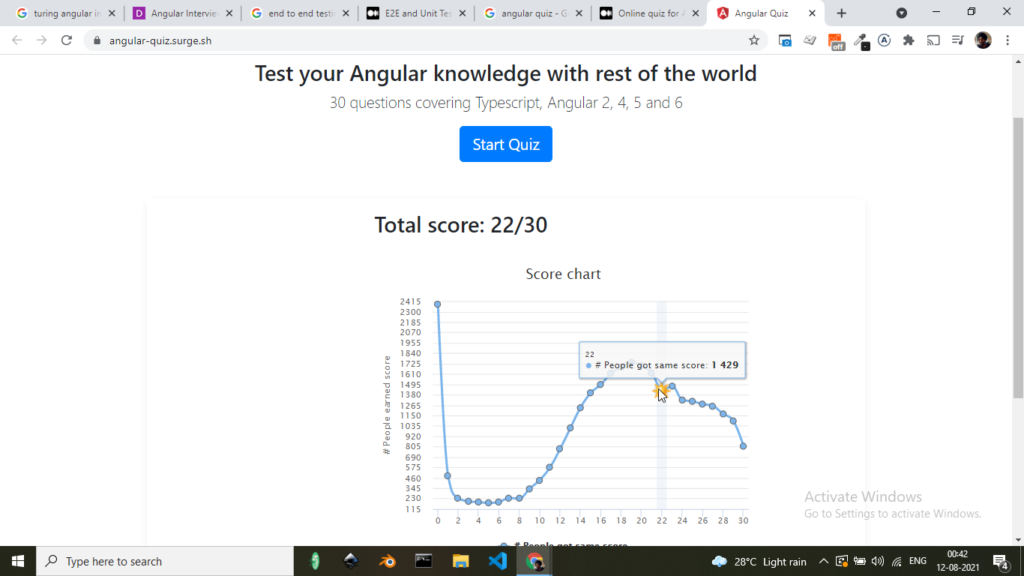
So after searching on Google, I landed up over this blog (here) (not an intention to use the link wrongly here), I took the Quiz and here is my result below with the image.

I too read some articles in the morning and look for tips and tricks on Angular so I can heads up well for the next interview on Angular 🙂

So I tried Quiz from the above blog link and here it is:

Question ah? How it could prove its my result, you can check on the full screenshot from my computer currently and tiny image up on the top corner and below on the Task bar with Chrome Active.

JAT-angular-quiz-result-with-rest-of-the-WORLD!

That’s all I would like to share with you all.

Thanks for reading and visiting. Have a great time and year’s ahead!

P.S. yes I forgot to mention, I am next going to take up more quiz and sharp my Angular blade more finer as possible as to be! Happy Learnings!

Categories
Javascript Learning Tech

How to add Buy me coffee script dynamically into React application or Javascript

Stumble upon in the search of adding Buy me coffee script into react application land to the following wonderful hook solution to add script to react on stack overflow here

I will also add up here the update code of stack overflow which helped in the solution (for incase above shared link will be changed in future, and all the code credit is to the author of stack overflow user)

Update:
Now that we have hooks, a better approach might be to use useEffect like so:

useEffect(() => {
  const script = document.createElement('script');

  script.src = "https://use.typekit.net/foobar.js";
  script.async = true;

  document.body.appendChild(script);

  return () => {
    document.body.removeChild(script);
  }
}, []);
Which makes it a great candidate for a custom hook (eg: hooks/useScript.js):

import { useEffect } from 'react';

const useScript = url => {
  useEffect(() => {
    const script = document.createElement('script');

    script.src = url;
    script.async = true;

    document.body.appendChild(script);

    return () => {
      document.body.removeChild(script);
    }
  }, [url]);
};

export default useScript;
Which can be used like so:

import useScript from 'hooks/useScript';

const MyComponent = props => {
  useScript('https://use.typekit.net/foobar.js');

  // rest of your component
}

Solution, I have added on top a ‘config’ param to the useScript function for easy BMC Buy me coffee widget attributes to get added to script object dynamically:

const useScript = (url, config = null) => {

  useEffect(() => {
    const script = document.createElement("script");

    script.src = url;
    script.async = true;

    if (config && Object.keys(config).length) {
      for (let key in config) {
        script.setAttribute(key, config[key]);
      }
    }

    // console.log(script);
    document.body.appendChild(script);

    return () => {
      document.body.removeChild(script);
    };
  }, [url]);
};

export default useScript;

Boom!

Categories
Javascript Learning Tech

How to play with Graphql playground for Mutation’s?

Okay, well I was also looking for solution to this and here it is:

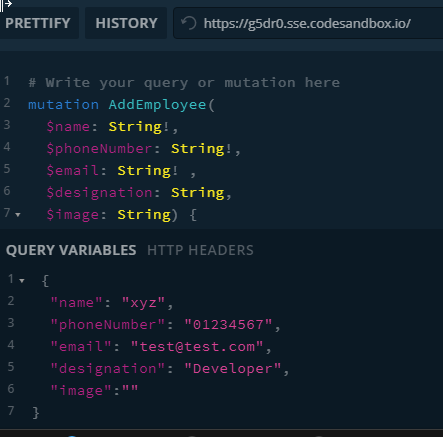
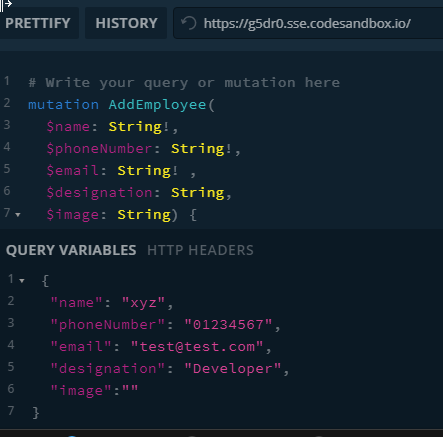
Mutation example of adding employee using Graphql Playground, most important step after you have added the code below to playground tab window:

# Write your query or mutation here
mutation AddEmployee(
  $name: String!,
  $phoneNumber: String!,
  $email: String! ,
  $designation: String,
  $image: String) {
    addEmployee(employee: 
      { name: $name, phoneNumber:$phoneNumber, email: $email, designation: $designation, image:$image },
    ) 
      {
        emp_id
        name
      }
    
}

You need to add your JSON payload to QUERY VARIABLES tab window (which is closed by default on below main playground window, without this input payload you will not see results, but error. (keep an eye on here while you make mutation test in graphql playground)

grapql-mutation-example-with-query-variable-input-parameters

Thanks for visiting!