Categories
Javascript Tech

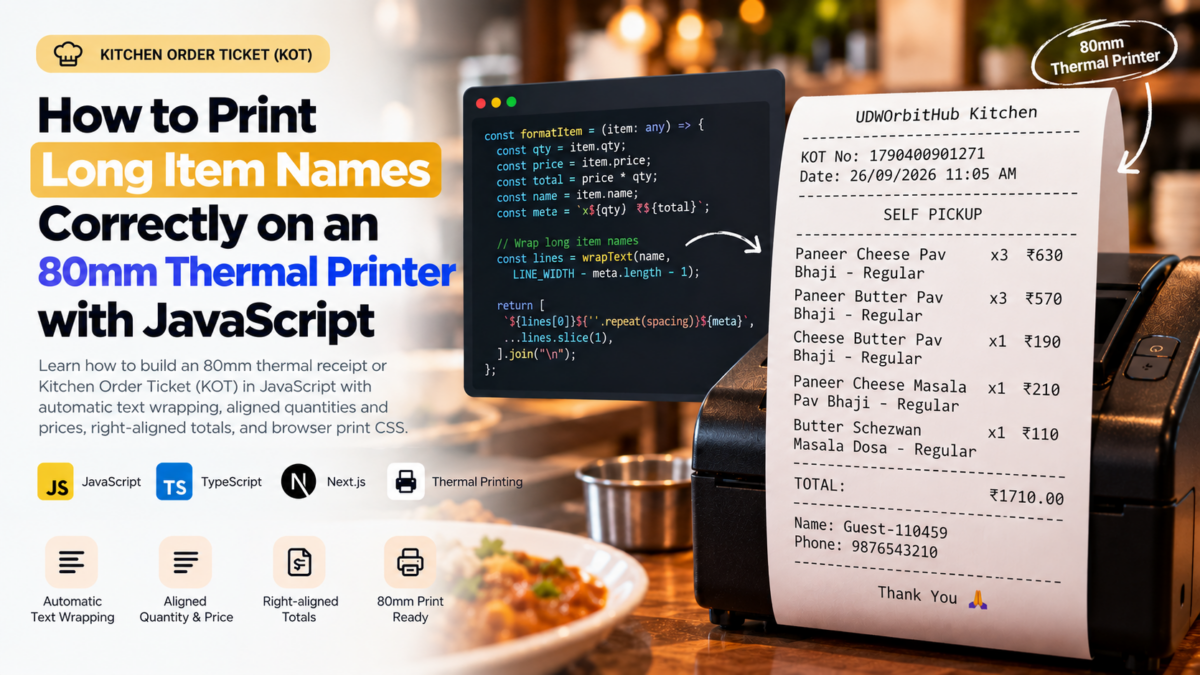
How to Print Long Item Names Correctly on an 80mm Thermal Printer with JavaScript

Printing receipts from a web application looks simple until you encounter a menu item with a long name.

A short item may print perfectly:

Butter Pav Bhaji       x1 ₹150

But a longer item can easily break an 80mm thermal receipt:

Paneer Cheese Pav Bhaji - Regular x1 ₹210

The quantity or price may move outside the printable area, text may be clipped, or the printer may wrap the line at an unexpected position.

I encountered this while generating a Kitchen Order Ticket (KOT) using JavaScript and browser printing.

The solution was not to reduce the font size or truncate menu item names.

Instead, I created a small fixed-width text formatter that:

  • wraps long item names automatically
  • avoids cutting words where possible
  • keeps quantity and price visible
  • keeps the total amount right-aligned
  • supports preparation options and notes
  • prints consistently on an 80mm thermal printer

Here’s how it works.


The Original Problem

The initial formatter was straightforward:

const LINE_WIDTH = 32;

const formatItem = (item: any) => {
    const total = item.price * item.qty;

    const left = `${item.name} x${item.qty}`;
    const right = `₹${total}`;

    const spacing =
        LINE_WIDTH - left.length - right.length;

    return (
        left +
        " ".repeat(Math.max(1, spacing)) +
        right
    );
};

For short menu items, this works well:

Butter Pav Bhaji       x1 ₹150

The formatter calculates the space between the item description and price and inserts enough spaces to align the amount.

The problem starts when the item name becomes longer than the available width.

For example:

Paneer Cheese Pav Bhaji - Regular x1 ₹210

There is no longer enough space for the item name, quantity, and price on the same line.

The calculation:

LINE_WIDTH - left.length - right.length

becomes negative.

Using:

Math.max(1, spacing)

prevents an invalid number of spaces, but it doesn’t solve the real problem: the text itself is too long for the receipt.


Why 80mm Thermal Printing Needs Special Handling

An 80mm paper roll does not necessarily provide 80mm of usable text space.

The actual printable area depends on several factors:

  • printer hardware margins
  • printer driver settings
  • browser print scaling
  • CSS padding
  • font family
  • font size
  • operating system print settings

For plain-text thermal printing, using a monospace font with a predictable character width makes formatting much easier.

In this example, I use:

const LINE_WIDTH = 32;

Thirty-two characters is deliberately conservative.

Some 80mm printers can fit more characters per line, but using a slightly smaller width makes the receipt more reliable across different printers and browser print configurations.


Step 1: Create Basic Receipt Helpers

First, define the receipt width and helpers for separators and centered text.

const LINE_WIDTH = 32;

const line = () => "-".repeat(LINE_WIDTH);

const center = (text: string) => {
    if (!text) return "";

    const space = Math.max(
        0,
        Math.floor(
            (LINE_WIDTH - text.length) / 2
        )
    );

    return " ".repeat(space) + text;
};

Now:

line();

produces:

--------------------------------

And:

center("SELF PICKUP");

produces approximately:

          SELF PICKUP

Because a monospace font is used later, each space has a predictable width.


Step 2: Create a Reusable Text-Wrapping Function

Next, we need a utility that can wrap long strings without cutting normal words in the middle.

const wrapText = (
    text: string,
    width: number
): string[] => {
    if (!text) return [];

    const words = text
        .trim()
        .split(/\s+/);

    const lines: string[] = [];

    let current = "";

    words.forEach((word) => {
        /*
         * Handle an individual word that is
         * longer than the entire available width.
         */
        if (word.length > width) {
            if (current) {
                lines.push(current);
                current = "";
            }

            for (
                let i = 0;
                i < word.length;
                i += width
            ) {
                lines.push(
                    word.slice(i, i + width)
                );
            }

            return;
        }

        const next = current
            ? `${current} ${word}`
            : word;

        if (next.length <= width) {
            current = next;
        } else {
            if (current) {
                lines.push(current);
            }

            current = word;
        }
    });

    if (current) {
        lines.push(current);
    }

    return lines;
};

For example:

wrapText(
    "Paneer Cheese Masala Pav Bhaji Regular",
    20
);

can produce:

Paneer Cheese Masala
Pav Bhaji Regular

Instead of:

Paneer Cheese Masala P
av Bhaji Regular

This makes printed receipts significantly easier to read.


Step 3: Format the Item While Reserving Space for Quantity and Price

The important part is that the item description should be flexible, while the quantity and price should remain readable.

For example, we want:

Paneer Cheese Pav    x3 ₹630
Bhaji

rather than:

Paneer Cheese Pav Bhaji x3 ₹
630

We can accomplish this by calculating how much space the metadata requires first.

const formatItem = (item: any) => {
    const qty = Number(
        item.qty || 0
    );

    const price = Number(
        item.price || 0
    );

    const total = price * qty;

    const name = String(
        item.name || ""
    ).trim();

    const meta = `x${qty} ₹${total}`;

    /*
     * Reserve enough room on the first
     * line for quantity and price.
     */
    const availableWidth = Math.max(
        10,
        LINE_WIDTH - meta.length - 1
    );

    const words = name.split(/\s+/);

    let firstLine = "";

    const remainingWords: string[] = [];

    for (
        let index = 0;
        index < words.length;
        index++
    ) {
        const word = words[index];

        const candidate = firstLine
            ? `${firstLine} ${word}`
            : word;

        if (
            candidate.length <=
            availableWidth
        ) {
            firstLine = candidate;
        } else {
            remainingWords.push(
                ...words.slice(index)
            );

            break;
        }
    }

    /*
     * Handle an unusually long first word.
     */
    if (
        !firstLine &&
        remainingWords.length
    ) {
        const word =
            remainingWords.shift()!;

        firstLine = word.slice(
            0,
            availableWidth
        );

        if (
            word.length >
            availableWidth
        ) {
            remainingWords.unshift(
                word.slice(
                    availableWidth
                )
            );
        }
    }

    /*
     * Calculate spacing between the item
     * description and quantity/price.
     */
    const spacing = Math.max(
        1,
        LINE_WIDTH -
            firstLine.length -
            meta.length
    );

    const output = [
        `${firstLine}${" ".repeat(
            spacing
        )}${meta}`,
    ];

    /*
     * Remaining item description can use
     * the entire width of subsequent lines.
     */
    if (remainingWords.length) {
        output.push(
            ...wrapText(
                remainingWords.join(" "),
                LINE_WIDTH
            )
        );
    }

    return output.join("\n");
};

Now long item names wrap without pushing the price outside the receipt.

For example:

Paneer Cheese Pav    x3 ₹630
Bhaji

Another item might produce:

Paneer Cheese Masala x1 ₹210
Pav Bhaji - Regular

And an even longer item remains safe:

Paneer Tikka Butter  x2 ₹640
Masala Special Family Size
with Extra Cheese

Step 4: Support Preparation Options and Notes

Kitchen tickets often contain more than the product name.

For example:

Paneer Butter Pav    x1 ₹190
Bhaji
  No Onion, Less Oil
  Note: Extra spicy

You can build the items section like this:

const itemsBlock = cart
    .map((item: any) =>
        [
            formatItem(item),

            item.prepOptions?.length
                ? "  " +
                  item.prepOptions.join(", ")
                : "",

            item.note
                ? "  Note: " + item.note
                : "",
        ]
            .filter(Boolean)
            .join("\n")
    )
    .join("\n");

This keeps additional kitchen instructions underneath their corresponding item.


Step 5: Right-Align the Total Amount

The same fixed-width technique can also create a cleaner total row.

Instead of:

TOTAL: ₹1710.00

we can print:

TOTAL:                  ₹1710.00

Create another formatter:

const formatTotal = (
    total: number | string
) => {
    const left = "TOTAL:";
    const right = `₹${total}`;

    const spacing = Math.max(
        1,
        LINE_WIDTH -
            left.length -
            right.length
    );

    return (
        left +
        " ".repeat(spacing) +
        right
    );
};

Then use:

formatTotal(total);

The result is:

--------------------------------
TOTAL:                  ₹1710.00
--------------------------------

This makes totals much easier to identify on a printed receipt.


Step 6: Build the Complete KOT

Here is a simplified version of the receipt builder.

This example uses dayjs for the timestamp.

View Complete Source Code section below in this page.


Step 7: Configure Browser Printing for 80mm Paper

Formatting the text correctly is only half of the solution.

The browser also needs to know that the output is intended for an 80mm thermal printer.

First, create a small HTML escape function.

const escapeHtml = (
    value: string
) => {
    return value
        .replace(/&/g, "&amp;")
        .replace(/</g, "&lt;")
        .replace(/>/g, "&gt;")
        .replace(/"/g, "&quot;")
        .replace(/'/g, "&#039;");
};

Escaping the receipt is important because item names, customer information, notes, and other values may contain characters that would otherwise be interpreted as HTML.

Then create the print function:

export const printReceipt = (
    text: string
) => {
    const printWindow =
        window.open("", "_blank");

    if (!printWindow) return;

    printWindow.document.write(`
        <!DOCTYPE html>

        <html>
            <head>
                <title>KOT</title>

                <style>
                    @page {
                        size: 80mm auto;
                        margin: 0;
                    }

                    * {
                        box-sizing: border-box;
                    }

                    html,
                    body {
                        margin: 0;
                        padding: 0;
                        width: 80mm;
                        background: #fff;
                    }

                    pre {
                        margin: 0;
                        padding: 4mm 3mm;
                        width: 80mm;

                        font-family:
                            "Courier New",
                            Courier,
                            monospace;

                        font-size: 12px;
                        line-height: 1.35;

                        white-space: pre-wrap;
                        overflow-wrap: break-word;

                        color: #000;
                    }

                    @media print {
                        html,
                        body {
                            width: 80mm;
                        }

                        pre {
                            width: 80mm;
                        }
                    }
                </style>
            </head>

            <body>
                <pre>${escapeHtml(text)}</pre>
            </body>
        </html>
    `);

    printWindow.document.close();

    printWindow.focus();

    setTimeout(() => {
        printWindow.print();
    }, 100);
};

The important CSS is:

@page {
    size: 80mm auto;
    margin: 0;
}

combined with:

font-family:
    "Courier New",
    Courier,
    monospace;

A monospace font is particularly important because the JavaScript formatter relies on characters having approximately equal visual widths.


Printing the KOT

Once the formatter and print function are ready, printing becomes straightforward:

const handlePrint = () => {
    if (!cart?.length) return;

    const text =
        buildThermalPrint({
            cart,
            customer,
            orderType,
            store,
            receiptNo,
        });

    printReceipt(text);
};

You can then connect it to a button:

<button
    type="button"
    onClick={handlePrint}
>
    Print KOT
</button>

Final Output

The resulting KOT can look like this:

         MY STORE Kitchen
--------------------------------
KOT No: 1790400901271
Date: 26/09/2026 11:05 AM
--------------------------------
          SELF PICKUP
--------------------------------
Paneer Cheese Pav    x3 ₹630
Bhaji - Regular

Paneer Butter Pav    x3 ₹570
Bhaji - Regular

Cheese Butter Pav    x1 ₹190
Bhaji - Regular

Paneer Cheese Masala x1 ₹210
Pav Bhaji - Regular

Butter Schezwan      x1 ₹110
Masala Dosa - Regular
--------------------------------
TOTAL:                  ₹1710.00
--------------------------------
Name: Guest Customer
Phone: 9876543210
--------------------------------
           Thank You

Long menu item names no longer push the quantity or price outside the receipt width.

The receipt also remains plain text, which makes it lightweight and suitable for thermal printing.


Why Not Just Use CSS word-wrap?

You could allow the browser to automatically wrap everything:

white-space: pre-wrap;
overflow-wrap: break-word;

But that alone doesn’t understand the structure of a receipt.

The browser might produce something like:

Paneer Cheese Pav Bhaji - Regular x3
₹630

or:

Paneer Cheese Pav Bhaji -
Regular x3 ₹630

That may technically fit, but it gives you less control over the kitchen ticket layout.

By formatting the text before printing, we explicitly tell the receipt:

  1. how wide a line can be
  2. where the item description should wrap
  3. where quantity should appear
  4. where price should appear
  5. how totals should align

CSS then handles the physical 80mm page.

The two approaches work together.


Why Use Plain Text Instead of an HTML Table?

HTML tables and CSS Grid can also produce excellent receipts.

However, plain-text formatting has some useful properties for thermal printing:

  • simple output
  • predictable layout
  • easy debugging
  • minimal CSS
  • easy copying and logging
  • works naturally with monospace printers
  • straightforward alignment

For more sophisticated receipts containing logos, multiple columns, QR codes, taxes, discounts, or complex invoice structures, an HTML-based layout may be preferable.

For a KOT, however, fixed-width text can be an effective solution.


Important: Character Width Is Not Physical Width

One thing to keep in mind is that:

const LINE_WIDTH = 32;

does not mean every 80mm printer can only print 32 characters.

Depending on the printer, font, DPI, and driver configuration, you may be able to use:

32
40
42

or even:

48

characters per line.

Start conservatively and test with the actual thermal printer.

For example:

const LINE_WIDTH = 32;

is safer than increasing the width until the text is almost touching both edges of the paper.

A small amount of unused horizontal space is usually preferable to clipped kitchen tickets.


Browser Printing Has Limitations

This implementation uses:

window.print();

That means the browser and operating system still control the final print process.

Depending on the environment, users may still need to select:

  • the correct thermal printer
  • 80mm paper size
  • appropriate margins
  • 100% print scale
  • header/footer disabled

For a web-based POS or restaurant ordering system, this approach works well when manual browser printing is acceptable.

If completely silent printing is required, a dedicated local printing solution or printer integration may eventually be necessary.


Final Thoughts

The key lesson is that thermal receipt formatting should not depend entirely on the browser deciding where text should wrap.

For a predictable 80mm KOT:

  1. use a monospace font
  2. define a maximum character width
  3. reserve space for quantity and price
  4. wrap long item names yourself
  5. right-align important numeric values
  6. explicitly configure the 80mm print page
  7. test against the physical printer

Instead of shrinking fonts or truncating menu item names, this approach lets the content naturally expand vertically while keeping the receipt width predictable.

That is usually exactly what you want from a thermal Kitchen Order Ticket.


Complete Source Code

The complete TypeScript implementation is available here:

View the 80mm Thermal KOT Printing Code → Coming soon this page.


Frequently Asked Questions

What line width should I use for an 80mm thermal printer?

There is no universal character count because it depends on the printer, font size, driver, and margins.

A value such as:

const LINE_WIDTH = 32;

is a conservative starting point.

Test the result using the actual printer before increasing it.

Why should I use a monospace font?

The formatter aligns content by counting characters and inserting spaces.

With a proportional font, characters have different visual widths, so:

TOTAL:                  ₹1710.00

may not align correctly.

A monospace font gives every character approximately the same width.

Can this work with a 58mm thermal printer?

Yes.

The same formatter can be used, but LINE_WIDTH, font size, and CSS width should be adjusted for the smaller paper size.

For example, you might start with a smaller line width and:

@page {
    size: 58mm auto;
}

The exact configuration should be tested against the target printer.

Can I print preparation options and kitchen notes?

Yes.

Because additional information is printed underneath the item, modifiers fit naturally:

Paneer Butter Pav    x1 ₹190
Bhaji
  No Onion, Less Oil
  Note: Extra spicy

This makes the same approach particularly useful for restaurant KOT printing.

Should I truncate long menu item names?

Usually, no.

For kitchen tickets, the full item name can be operationally important.

Allowing the description to wrap onto another line is generally safer than hiding part of the item name just to maintain a single-line layout.


If you’re building a restaurant POS, ordering application, or any web application that needs thermal printing, this fixed-width formatting approach provides a simple foundation that can later be extended for taxes, discounts, order numbers, QR codes, modifiers, and other receipt information.

Categories
Blog Senior Citizen Schemes & Benefits

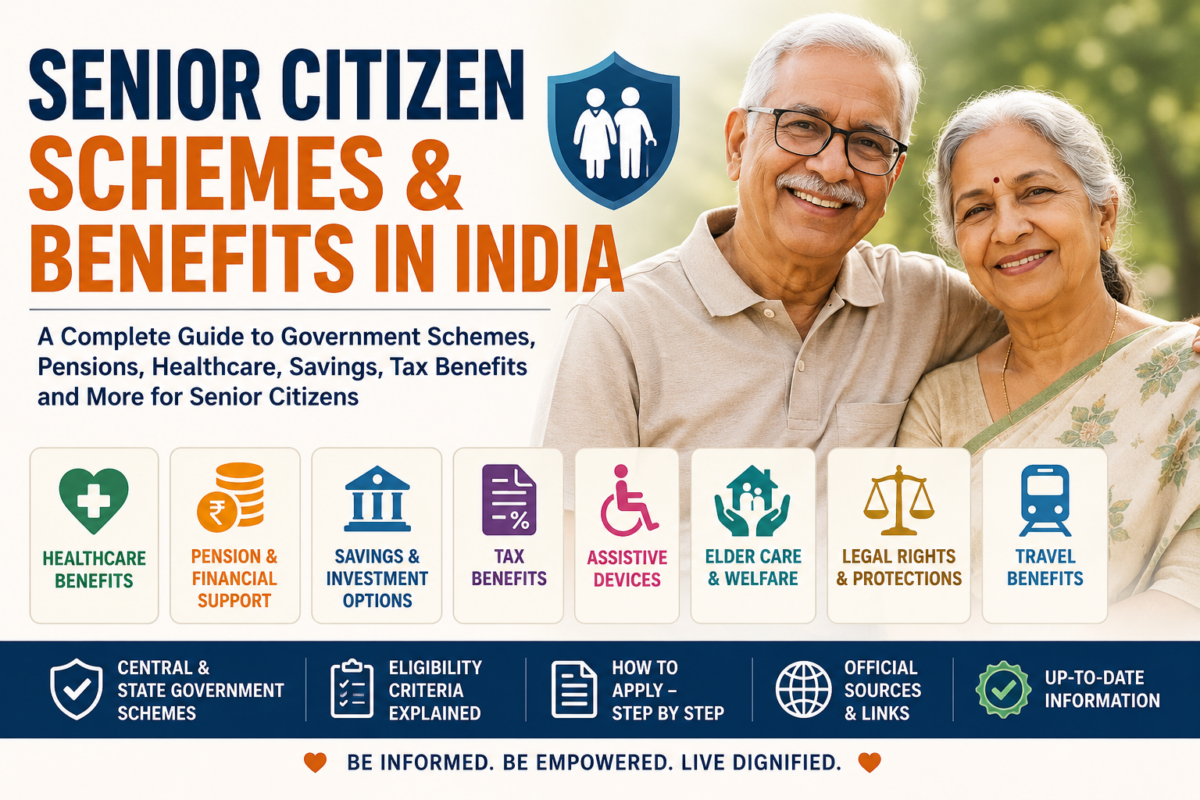
Senior Citizens Schemes, Benefits & Welfare Programs in India


1. DOCUMENT PURPOSE

This document provides the complete content structure, context, information architecture, and recommended sections for a comprehensive resource covering government schemes, financial benefits, healthcare support, pensions, welfare programmes, and other facilities available to senior citizens in India.

The objective is to create a reliable and easy-to-understand platform that helps senior citizens and their families discover:

  • Government schemes
  • Financial assistance
  • Pension schemes
  • Healthcare benefits
  • Insurance support
  • Investment options
  • Tax benefits
  • Banking benefits
  • State Government schemes
  • Legal rights
  • Travel concessions
  • Assistive devices
  • Care and support services

The content should simplify complex government schemes and present them in a structured, practical and actionable format.


2. PRIMARY CONTENT OBJECTIVE

The primary objective is:

To help every senior citizen in India understand what benefits they may be eligible for and how they can access them.

The platform should answer five fundamental questions for every scheme:

1. What is this scheme?

A simple explanation of the scheme.

2. Who is eligible?

Clear eligibility criteria.

3. What benefits are available?

Financial, healthcare or other benefits.

4. How can someone apply?

Step-by-step application guidance.

5. Where can official information be verified?

Official government or authorised source.


3. TARGET AUDIENCE

Primary Audience

Senior Citizens

Individuals aged 60 years and above looking for:

  • Financial security
  • Pension benefits
  • Healthcare support
  • Government schemes
  • Savings options
  • Welfare services

Secondary Audience

Family Members

Children and family members helping elderly parents understand:

  • Medical schemes
  • Pension applications
  • Financial planning
  • Government benefits
  • Elder care services

Caregivers

Individuals responsible for:

  • Elderly care
  • Medical assistance
  • Documentation
  • Government applications

Retirement Planning Audience

Individuals aged 50+ who want to understand:

  • Future retirement benefits
  • Pension options
  • Senior citizen investment schemes
  • Healthcare planning

4. MAIN CONTENT POSITIONING

The platform should not simply say:

“Here are some government schemes.”

Instead, it should position itself as:

India’s simplified guide to senior citizen benefits, schemes, rights and support services.

The content should be:

  • Simple
  • Trustworthy
  • Non-technical
  • Action-oriented
  • Updated regularly
  • Easy for elderly users to understand

5. MASTER CONTENT STRUCTURE

PAGE TITLE

Senior Citizen Schemes and Benefits in India – Complete Guide

Suggested Subtitle

Explore government schemes, pensions, healthcare benefits, savings options, tax advantages and welfare programmes available for senior citizens in India.


6. INTRODUCTION SECTION

Growing Older Should Not Mean Navigating Everything Alone

India has a rapidly growing senior citizen population. While multiple Central and State Government schemes are available, many senior citizens remain unaware of the benefits they may be entitled to.

Benefits may be available in areas such as:

  • Healthcare
  • Pension
  • Financial assistance
  • Savings
  • Investment
  • Taxation
  • Assistive devices
  • Housing
  • Legal protection
  • Social welfare

However, the information is often spread across multiple government departments and websites.

This guide brings important information together in one place.


7. QUICK BENEFITS OVERVIEW

Create a visual category section.

Explore Benefits by Category

🏥 Healthcare Benefits

Health insurance, hospital treatment and medical support.

💰 Pension & Financial Support

Government pensions and financial assistance.

🏦 Savings & Investment

Safe investment and income options for retirement.

🧾 Tax Benefits

Income tax deductions and exemptions.

♿ Assistive Devices

Mobility aids, hearing aids, spectacles and other support.

🏠 Elder Care & Welfare

Senior citizen homes, day care and support programmes.

⚖️ Legal Rights

Protection and legal rights of senior citizens.

🚆 Travel Benefits

Travel-related concessions and facilities where applicable.

🏛️ State Government Schemes

Benefits available based on the state of residence.


8. FEATURED SCHEMES SECTION

Important Government Schemes for Senior Citizens

Display schemes in card format.

Each card should contain:

  • Scheme Name
  • Category
  • Short Description
  • Age Eligibility
  • Main Benefit
  • View Details Button

Suggested Featured Schemes

  1. Senior Citizens Savings Scheme
  2. Ayushman Bharat for Senior Citizens
  3. Atal Vayo Abhyuday Yojana
  4. Rashtriya Vayoshri Yojana
  5. Indira Gandhi National Old Age Pension Scheme
  6. State Old Age Pension Schemes
  7. Post Office Monthly Income Scheme
  8. Pradhan Mantri Vaya Vandana Yojana – Historical/Status-based information
  9. Senior Citizen Welfare Fund
  10. Tax Benefits for Senior Citizens

9. CATEGORY ONE – HEALTHCARE BENEFITS

Healthcare Schemes for Senior Citizens

Healthcare is one of the most important concerns during retirement. Medical expenses can increase significantly with age, making access to government healthcare programmes and insurance coverage extremely important.


9.1 Ayushman Bharat – PM-JAY

Purpose

Provides health coverage for eligible beneficiaries.

Key Information

  • Hospitalisation coverage
  • Cashless treatment
  • Empanelled hospitals
  • Secondary healthcare
  • Tertiary healthcare

Senior Citizen Focus

Special provisions and expanded coverage should be clearly explained for senior citizens aged 70 years and above, according to prevailing government rules.

Information Fields

FieldDetails
Scheme NameAyushman Bharat PM-JAY
CategoryHealthcare
Age EligibilityAs per current scheme rules
CoverageAs notified
ApplicationOnline / authorised centres
DocumentsAadhaar and required identification
Official PortalGovernment link

9.2 State Health Insurance Schemes

Create state-specific listings.

Examples may include:

  • Maharashtra schemes
  • Tamil Nadu schemes
  • Karnataka schemes
  • Delhi schemes
  • Gujarat schemes
  • Kerala schemes

Each state page should clearly explain:

  • Scheme name
  • Eligibility
  • Coverage
  • Hospitals
  • Application process

9.3 Free or Subsidised Healthcare Facilities

Cover information relating to:

  • Government hospitals
  • Geriatric departments
  • Primary healthcare centres
  • Subsidised medicines
  • Government health camps
  • Mobile healthcare services

10. CATEGORY TWO – PENSION & FINANCIAL ASSISTANCE

Pension Schemes for Senior Citizens

Financial independence is essential for a secure and dignified retirement.

Government pension schemes provide financial assistance to eligible elderly citizens, particularly those belonging to economically vulnerable households.


10.1 Indira Gandhi National Old Age Pension Scheme

Purpose

Financial assistance for eligible elderly citizens.

Content Structure

What is the Scheme?

Simple explanation.

Who Can Apply?

Explain eligibility based on:

  • Age
  • Economic category
  • Government criteria

Benefits

Explain:

  • Central assistance
  • Possible State Government contribution

How to Apply

Step-by-step guidance.

Documents Required

  • Aadhaar
  • Age proof
  • Bank details
  • Income/category documents where applicable

10.2 State Old Age Pension Schemes

This section should be highly developed.

State Selection

Allow users to select:

Select Your State

Example:

  • Maharashtra
  • Gujarat
  • Delhi
  • Karnataka
  • Tamil Nadu
  • Kerala
  • Rajasthan
  • Uttar Pradesh
  • Punjab
  • Haryana
  • West Bengal

For every state, display:

InformationDetails
Scheme Name
Minimum Age
Pension Amount
Eligibility
Application Method
Required Documents
Department
Official Link

11. CATEGORY THREE – SAVINGS & INVESTMENT

Safe Investment Options for Senior Citizens

Many senior citizens depend on savings accumulated during their working years.

The content should explain safe and government-backed investment options.


11.1 Senior Citizens Savings Scheme (SCSS)

Overview

Government-backed savings scheme designed specifically for senior citizens.

Important Information

  • Eligibility
  • Minimum investment
  • Maximum investment
  • Interest rate
  • Interest payment frequency
  • Tenure
  • Extension options
  • Premature withdrawal rules
  • Tax implications

Who Should Consider It?

Suitable for individuals looking for:

  • Regular income
  • Capital protection
  • Government-backed investment
  • Predictable returns

11.2 Post Office Monthly Income Scheme

Explain:

  • Monthly income concept
  • Investment tenure
  • Eligibility
  • Joint account options
  • Interest payout

11.3 Bank Fixed Deposits for Senior Citizens

Explain:

  • Additional interest benefits
  • Tenure comparison
  • Premature withdrawal
  • Safety considerations

11.4 Government Bonds and Other Safe Instruments

Educational section covering:

  • Government securities
  • RBI products
  • Bonds
  • Other low-risk instruments

Important:

The platform should remain educational and should not provide personalised investment advice without appropriate disclaimers.


12. CATEGORY FOUR – TAX BENEFITS

Income Tax Benefits for Senior Citizens

Senior citizens may receive different tax benefits depending on the applicable tax regime and prevailing income tax laws.

This section should be updated annually after the Union Budget.


Suggested Subsections

12.1 Income Tax Slabs

Explain differences where applicable between:

  • Individual
  • Senior Citizen
  • Super Senior Citizen

12.2 Health Insurance Deductions

Explain relevant deductions for:

  • Health insurance premiums
  • Medical expenditure where applicable

12.3 Interest Income Benefits

Explain applicable provisions relating to:

  • Bank interest
  • Post office interest
  • Savings interest

Important Disclaimer

Tax laws change regularly. Always verify the latest provisions or consult a qualified tax professional.


13. CATEGORY FIVE – ASSISTIVE DEVICES

Support for Senior Citizens with Age-Related Disabilities

Many elderly citizens experience mobility, hearing, vision and other age-related difficulties.

Government programmes may provide support through assistive devices.


Rashtriya Vayoshri Yojana

Possible Assistance

Depending on eligibility and assessment:

  • Walking sticks
  • Wheelchairs
  • Hearing aids
  • Spectacles
  • Dentures
  • Mobility devices

Purpose

To improve:

  • Mobility
  • Independence
  • Quality of life
  • Dignity

14. CATEGORY SIX – ELDER CARE & WELFARE

Welfare Programmes for Senior Citizens

This section should cover programmes supporting elderly citizens who require additional care and assistance.


14.1 Atal Vayo Abhyuday Yojana

Explain the broader senior citizen welfare framework.

Areas

  • Senior citizen care
  • Shelter
  • Medical assistance
  • Recreational activities
  • Active ageing
  • Community support

14.2 Old Age Homes

Provide information on:

  • Government-supported homes
  • NGO-operated homes
  • Eligibility
  • Admission process

14.3 Day Care Centres

Explain:

  • Day support
  • Social activities
  • Healthcare support
  • Recreational activities

15. CATEGORY SEVEN – LEGAL RIGHTS

Legal Rights of Senior Citizens in India

This is an important section that is often missing from senior citizen information platforms.

Content should explain the legal rights and protections available to elderly citizens.


Suggested Topics

Maintenance and Welfare Rights

Explain legal provisions relating to:

  • Maintenance responsibilities
  • Protection against neglect
  • Welfare mechanisms

Protection Against Abuse

Information on:

  • Elder abuse
  • Financial exploitation
  • Neglect
  • Property-related concerns

Legal Assistance

Explain where senior citizens can seek help:

  • Legal aid authorities
  • Senior citizen helplines
  • Police support
  • District welfare offices

16. CATEGORY EIGHT – BANKING BENEFITS

Banking Facilities for Senior Citizens

Senior citizens should be aware of banking facilities designed to make financial transactions easier.


Topics to Cover

Priority Services

Some institutions may provide:

  • Priority counters
  • Dedicated service desks
  • Simplified service processes

Doorstep Banking

Explain services where available:

  • Cash delivery
  • Document collection
  • Banking assistance

Senior Citizen Fixed Deposit Benefits

Compare:

  • Public sector banks
  • Private banks
  • Small finance banks

Important comparison fields:

BankSenior Citizen RateTenureMinimum DepositPremature Withdrawal

17. CATEGORY NINE – TRAVEL BENEFITS

Travel Facilities for Senior Citizens

This section should explain currently applicable benefits and facilities.

Topics may include:

  • Railway facilities
  • Reserved seating
  • Airport assistance
  • Public transport concessions
  • State transport benefits

Important:

Benefits and concessions may change. This section should always display the “Last Updated Date.”


18. CATEGORY TEN – STATE-WISE SCHEMES

Senior Citizen Schemes by State

This should become one of the strongest sections of the platform.


State Directory

Maharashtra

Include:

  • Pension schemes
  • Healthcare schemes
  • Senior welfare programmes
  • Transport benefits

Gujarat

Include relevant State Government benefits.

Delhi

Include relevant State Government benefits.

Karnataka

Include relevant State Government benefits.

Tamil Nadu

Include relevant State Government benefits.

Kerala

Include relevant State Government benefits.


Recommended Future Structure

Create individual pages:

/senior-citizen-schemes/maharashtra

/senior-citizen-schemes/gujarat

/senior-citizen-schemes/delhi

/senior-citizen-schemes/karnataka

/senior-citizen-schemes/tamil-nadu

This creates strong SEO architecture.


19. HOW TO APPLY SECTION

How to Apply for Senior Citizen Schemes

Many senior citizens find government application processes confusing.

Therefore, every scheme should have a standard application section.


Step 1 – Check Eligibility

Check:

  • Age
  • Income
  • Residence
  • Social category
  • Existing benefits

Step 2 – Keep Documents Ready

Common documents include:

  • Aadhaar Card
  • PAN Card
  • Age proof
  • Address proof
  • Bank account details
  • Passport photographs
  • Income certificate
  • Pension documents
  • Disability certificate where applicable

Step 3 – Apply Through the Correct Channel

Possible channels:

  • Online portal
  • Government office
  • CSC centre
  • Bank
  • Post office
  • District welfare office

Step 4 – Track Application

Explain:

  • Application number
  • Status tracking
  • Helpline
  • Escalation process

20. SCHEME DETAIL PAGE TEMPLATE

Every scheme should follow the same content format.


[SCHEME NAME]

Category

Healthcare / Pension / Investment / Welfare

Quick Summary

A simple 2–3 line explanation.


What Is This Scheme?

Detailed but easy-to-understand explanation.


Who Is Eligible?

Bullet points:

  • Age requirement
  • Income requirement
  • Residence requirement
  • Other criteria

What Benefits Are Available?

Clearly explain:

  • Financial benefit
  • Healthcare coverage
  • Equipment
  • Pension
  • Interest income

How to Apply?

Step 1

Check eligibility.

Step 2

Prepare documents.

Step 3

Visit/apply through official channel.

Step 4

Submit application.

Step 5

Track status.


Documents Required

Checklist format.

☐ Aadhaar Card

☐ Age Proof

☐ Bank Passbook

☐ Address Proof

☐ Income Certificate


Important Things to Know

Highlight:

  • Deadlines
  • Renewal requirements
  • Limitations
  • Conditions

Frequently Asked Questions

Minimum 5–10 FAQs.


Official Source

Always link to the official Government or authorised portal.


Last Updated

Display:

Last verified: [Date]


21. ELIGIBILITY FINDER – FUTURE FEATURE

This can become the most valuable feature.

“Find Benefits You May Be Eligible For”

Ask users:

Question 1

What is your age?

  • 60–69
  • 70–79
  • 80+

Question 2

Which state do you live in?

Dropdown.

Question 3

What is your income category?

Optional categories.

Question 4

What are you looking for?

  • Healthcare
  • Pension
  • Investment
  • Financial support
  • Assistive devices
  • Elder care

Result

Show:

Based on your information, you may wish to check these schemes.

Important:

Use wording such as “may be eligible” until official eligibility is confirmed.


22. SENIOR CITIZEN RESOURCE DIRECTORY

Create an additional directory.

Important Resources

Government Resources

  • Ministry of Social Justice
  • Ministry of Health
  • National Health Authority
  • India Post
  • Pension authorities

Emergency Resources

  • Emergency services
  • Senior citizen helplines
  • Police assistance

Legal Resources

  • Legal aid services
  • Senior citizen tribunals
  • Government grievance portals

23. FAQ SECTION

Frequently Asked Questions About Senior Citizen Benefits in India

At what age is a person considered a senior citizen in India?

Generally, 60 years and above for many schemes, although eligibility varies.


What schemes are available for senior citizens?

Schemes may cover healthcare, pensions, savings, welfare, assistive devices and other benefits.


Can senior citizens get free healthcare?

Eligibility depends on applicable Central and State Government healthcare programmes.


Which investment is suitable for senior citizens?

The answer depends on financial requirements, risk profile and income needs. Government-backed options such as SCSS may be considered after understanding eligibility and current terms.


Can senior citizens receive both Central and State benefits?

In some cases, eligibility for benefits from Central and State programmes may coexist, subject to individual scheme rules.


How can I find schemes available in my state?

Use official government portals and state welfare department websites.


24. CONTENT DISCLAIMER

Important Information Disclaimer

This platform provides general information about government schemes and benefits.

Scheme details, eligibility criteria, financial benefits, interest rates and application processes may change.

Users should always verify the latest information through:

  • Official Government websites
  • Authorised departments
  • Banks
  • Post offices
  • Government service centres

The platform should not be considered a substitute for legal, financial, tax or medical advice.


25. CONTENT UPDATE POLICY

Government schemes change regularly.

Therefore, every scheme page should include:

Last Updated Date

Example:

Last Updated: August 2026

Verification Status

  • Verified from Official Source
  • Update Pending
  • Recently Changed

26. CONTENT TRUST FRAMEWORK

To build credibility, every scheme should be categorised by source reliability.

🟢 Official Government Source

Directly verified from government portal.

🔵 Government Partner

Information verified from authorised institution.

🟡 Information Under Review

Information requires further verification.

Avoid publishing outdated or unverified financial information.


27. SEO STRUCTURE

Primary Keywords

  • Senior citizen schemes India
  • Government schemes for senior citizens
  • Senior citizen benefits India
  • Old age pension scheme India
  • Healthcare schemes for senior citizens
  • Senior citizen pension
  • Senior citizen savings scheme
  • Benefits for elderly people India

Long-Tail Keywords

  • What benefits are available for senior citizens in India
  • Government pension for senior citizens
  • Free healthcare for senior citizens India
  • Senior citizen schemes in Maharashtra
  • How to apply for old age pension
  • Best government schemes for senior citizens
  • Financial assistance for elderly people in India

28. RECOMMENDED WEBSITE ARCHITECTURE

Main Page

/senior-citizen-benefits


Category Pages

/senior-citizen-benefits/healthcare

/senior-citizen-benefits/pension

/senior-citizen-benefits/investment

/senior-citizen-benefits/tax-benefits

/senior-citizen-benefits/welfare

/senior-citizen-benefits/legal-rights

/senior-citizen-benefits/banking


State Pages

/senior-citizen-benefits/maharashtra

/senior-citizen-benefits/delhi

/senior-citizen-benefits/gujarat

/senior-citizen-benefits/karnataka


Individual Scheme Pages

/schemes/senior-citizens-savings-scheme

/schemes/ayushman-bharat-senior-citizens

/schemes/old-age-pension

/schemes/rashtriya-vayoshri-yojana


29. USER EXPERIENCE RECOMMENDATIONS

Since the target audience includes elderly users, the website should be designed differently from a normal content website.

Accessibility Recommendations

Larger Font Size

Avoid very small text.

Recommended:

  • Minimum 18px body text
  • Clear headings
  • High contrast

Simple Navigation

Use limited menu options.

Example:

HOME | SCHEMES | HEALTH | PENSION | STATE BENEFITS | HELP


Easy Language

Avoid government jargon.

Instead of:

Beneficiary shall be subject to means-tested eligibility criteria.

Use:

You may qualify depending on your income and financial situation.


Voice Search Compatibility

Future feature:

“What pension schemes can I get?”


Multilingual Support

Future expansion:

  • English
  • Hindi
  • Marathi
  • Tamil
  • Gujarati
  • Bengali
  • Kannada
  • Telugu

30. CONTENT DIFFERENTIATOR

Most websites simply list government schemes.

This platform should focus on:

“Understanding + Eligibility + Action”

Not just:

Here is the scheme.

But:

What does it mean?

Who can get it?

What documents are required?

How do I apply?

Where do I go?

What should I do if my application is rejected?

This practical approach can differentiate the platform.


31. RECOMMENDED HOMEPAGE FLOW

HERO SECTION

Heading

Discover Benefits Available for Senior Citizens

Subheading

Find government schemes, healthcare support, pensions, savings options and welfare benefits available for senior citizens in India.

CTA Buttons

[Explore Schemes]

[Find Benefits]


SECTION 2

What Are You Looking For?

Healthcare | Pension | Financial Support | Investment | Welfare


SECTION 3

Featured Schemes

Display 6 important scheme cards.


SECTION 4

Find Benefits in Your State

State selection dropdown.


SECTION 5

Recently Updated Schemes

Show recently verified information.


SECTION 6

Senior Citizen Guides

Articles such as:

  • How to apply for an old age pension
  • Healthcare options after retirement
  • Understanding SCSS
  • Documents every senior citizen should keep ready

SECTION 7

Frequently Asked Questions


SECTION 8

Important Disclaimer


32. FUTURE EXPANSION OPPORTUNITIES

The platform can eventually expand into:

Scheme Eligibility Calculator

Pension Calculator

Retirement Expense Calculator

Document Checklist Generator

State Benefit Finder

Senior Citizen Healthcare Directory

Government Hospital Finder

Old Age Home Directory

Senior Citizen Helpline Directory

Legal Assistance Directory


33. FINAL CONTENT STRATEGY

The recommended strategy is to build the platform in three layers.


LAYER 1 – INFORMATION

Provide accurate information.

What schemes exist?


LAYER 2 – UNDERSTANDING

Simplify government information.

What does this scheme actually mean?


LAYER 3 – ACTION

Help users take the next step.

What should I do now?


FINAL PLATFORM VISION

A Simple Vision

No senior citizen should miss an important benefit simply because they did not know it existed or did not understand how to apply.

The platform should become a trusted information resource that helps senior citizens and their families navigate India’s complex ecosystem of government schemes, healthcare benefits, pensions, financial assistance and welfare programmes.

The long-term objective should not be to create just another blog.

It should evolve into:

A Senior Citizen Benefits Knowledge & Discovery Platform for India

Combining:

Information + Eligibility + Guidance + Accessibility + Action

Recommended next step

Before developing individual articles, I would create a master scheme database structure behind this content—fields like Scheme Name, Ministry, Category, Age, Eligibility, Benefit Amount, Documents, Application URL, State, Last Verified Date, and Status.

That will prevent the blog from becoming just static articles and will allow you later to build filters, search, eligibility matching, and automatic state-wise pages.

Disclaimer: Scheme details, eligibility criteria, benefits, interest rates and application processes may change over time. Readers should verify the latest information through official government portals or authorised institutions before applying.

Categories
AI & Technology Javascript Programming Technology, Web Development World in Motion

🚀 JavaScript Evolution: From Browser Scripting to Universal Runtime (2026 Deep Dive)

🧠 Introduction

JavaScript is no longer just a browser scripting language—it is now the backbone of modern software development. From powering interactive web pages in the 1990s to running full-scale distributed systems, JavaScript has evolved into a universal runtime shaping how applications are built and deployed.

In this deep dive, we explore:

  • How JavaScript has transformed over time
  • What major features and paradigms were introduced
  • How its ecosystem reshaped development
  • Where JavaScript is heading in the next decade

But beyond just evolution, JavaScript has fundamentally shifted its role in the tech ecosystem. It didn’t just grow—it repositioned itself as a universal runtime across platforms.
👉 Read deeper insight: JavaScript Didn’t Just Evolve — It Repositioned Itself


🕰️ Phase 1: The Early Days (1995–2005)

JavaScript was created in 1995 with a simple goal:
👉 Make web pages interactive.

Key Characteristics

  • Loosely typed
  • Prototype-based inheritance
  • Event-driven execution
  • Minimal tooling

Limitations

  • No modular architecture
  • Browser inconsistencies
  • Callback-heavy async patterns

At this stage, JavaScript was often underestimated and considered unreliable for serious engineering.


⚙️ Phase 2: Standardization with ES5 (2009)

The release of ECMAScript 5 brought stability and structure.

What Changed

  • Strict mode ("use strict")
  • Native JSON support
  • Functional array methods (map, filter, reduce)
  • Better object control

Why It Mattered

This era laid the foundation for scalable JavaScript applications and enabled cleaner, more predictable codebases.


🔥 Phase 3: ES6 – The Turning Point (2015)

ES6 was not just an update—it was a complete transformation.

This transformation marked the beginning of a deeper shift—not just in syntax, but in how JavaScript positioned itself in the software world.
👉 Explore the full perspective here: JavaScript Didn’t Just Evolve — It Repositioned Itself

Major Features Introduced

Block Scoping

let count = 0;
const MAX = 10;

Arrow Functions

const sum = (a, b) => a + b;

Classes (Cleaner OOP)

class User {
constructor(name) {
this.name = name;
}
}

Modules (Finally!)

export const api = {};
import { api } from './file.js';

Promises

fetch(url).then(res => res.json());

Destructuring

const { name } = user;

🚀 Impact of ES6

  • Enabled large-scale applications
  • Improved readability and maintainability
  • Shifted JavaScript toward modern engineering standards

🌍 JavaScript Beyond the Browser

⚡ Node.js Revolution

JavaScript expanded to the backend, enabling:

  • Server-side development
  • APIs and microservices
  • Real-time applications

👉 One language, full stack.

This moment defined JavaScript’s identity shift—from a frontend scripting tool to a cross-platform runtime environment.
👉 Detailed breakdown: JavaScript Didn’t Just Evolve — It Repositioned Itself


🎨 Frontend Framework Shift

Development moved from manual DOM handling to structured UI systems:

  • React → Component-driven architecture
  • Angular → Full ecosystem
  • Vue → Reactive simplicity

This introduced:

Declarative UI + state-driven design


⏳ Async Evolution: The Biggest Developer Pain Solved

Before (Callback Hell)

fs.readFile(file, (err, data) => {});

Promises

readFile(file).then(data => {});

Async/Await (Modern Standard)

async function load() {
const data = await readFile(file);
}

Result

  • Cleaner logic
  • Better debugging
  • Synchronous-like flow

🧩 TypeScript Influence (The Silent Takeover)

JavaScript itself didn’t become typed—but the ecosystem did.

Why TypeScript Won

  • Large app complexity
  • Need for type safety
  • Better tooling

Real Impact

  • Enterprise-level adoption
  • Reduced runtime errors
  • Strong IDE support

Today:

TypeScript is often the default, not optional.


⚡ Modern JavaScript (ES2018–2026)

JavaScript now evolves every year with incremental improvements.

Key Modern Features

Optional Chaining

user?.profile?.name

Nullish Coalescing

value ?? "default"

Top-Level Await

const data = await fetch(url);

Logical Assignment

x ||= 10;

BigInt

const big = 999999999999999999n;

🧠 The Real Power: JavaScript Ecosystem

The language is only part of the story.

Tooling Explosion

  • Bundlers: Webpack, Vite
  • Transpilers: Babel
  • Linters: ESLint
  • Formatters: Prettier

Runtime Expansion

  • Browser
  • Node.js
  • Deno
  • Bun

Cross-Platform Reach

  • Mobile → React Native
  • Desktop → Electron
  • Cloud → Serverless functions

🔄 Paradigm Shift Summary

AreaOld JavaScriptModern JavaScript
Code StructureScriptsModules
AsyncCallbacksAsync/Await
UIManual DOMComponent-based
RuntimeBrowser onlyEverywhere
TypingDynamicTyped (TS)

🔮 Where JavaScript Is Heading

1. Edge Computing

JavaScript is moving closer to users:

  • Faster response times
  • Distributed execution

2. WebAssembly Integration

JavaScript will act as a bridge for high-performance code:

  • Gaming
  • AI
  • Video processing

3. Type-Safe Future

  • TypeScript dominance
  • Possible native type support

4. AI + JavaScript

JavaScript is becoming the interface layer for AI systems:

  • Browser AI apps
  • Node.js AI orchestration
  • AI SDK ecosystems
This reinforces a critical idea: JavaScript isn’t just evolving—it’s strategically positioning itself at the center of modern computing.  
👉 Read the deeper analysis: JavaScript Didn’t Just Evolve — It Repositioned Itself

5. New Runtimes

Emerging tools like Bun and Deno are pushing:

  • Faster execution
  • Better developer experience

⚠️ Challenges Ahead

1. Ecosystem Overload

Too many tools, too many choices.

2. Complexity

Modern JS requires:

  • Build systems
  • Configurations
  • Dependency management

3. Backward Compatibility

JavaScript cannot break existing web apps—limiting radical changes.


🏁 Final Thoughts

JavaScript’s evolution is not just technical—it’s philosophical.

It has transformed into:

A universal language that connects frontend, backend, mobile, cloud, and AI systems.

The future of JavaScript is not about replacing it—but expanding it further into every layer of computing.

🔗 Recommended Deep Read

If you want to truly understand the strategic shift behind JavaScript’s dominance, don’t miss this:

👉 JavaScript Didn’t Just Evolve — It Repositioned Itself

This article breaks down how JavaScript moved from a simple scripting language to becoming the backbone of modern development ecosystems.

Categories
Blog Life & Nature

🌟 What Jesus Loved: A Journey Into the Heart of His Life and Message

When we talk about Jesus, we often talk about what He did:
the miracles, the teachings, the cross, the resurrection.

But to truly understand Him, we must look at something deeper:
What did Jesus love?
What moved Him?
What was the pulse of His life?

Because love was not just something Jesus taught.
It was something He lived, moment by moment, breath by breath.

This is not just history.
This is the blueprint for a life filled with meaning, peace, and purpose.


  1. Jesus Loved God With His Whole Being

Jesus did not simply believe in God.
He lived in connection with God — the way a tree lives rooted to the soil.

He would slip away early in the morning
to quiet hills and silent lakeshores.
There, the world fell away, and only love remained.

He spoke to God not as a distant power,
but as Abba — a loving, intimate Father.

When we place God first,
everything else finds its place.


  1. Jesus Loved People — Fully, Completely, Without Choosing

He loved:

The forgotten

The broken

The rejected

The proud

The kind

The sinners

The saints

No walls.
No labels.
No conditions.

Jesus did not love because people were perfect.
He loved because love itself transforms.

He saw what others couldn’t see —
the child of God within each person.


  1. Jesus Loved to Forgive, Even When It Hurt

Forgiveness was not weakness to Him.
It was freedom.

On the cross — in pain, abandoned —
He did not curse.
He did not hate.
He prayed.

“Father, forgive them.”

He taught us the most difficult and most healing truth:

Forgiveness is not saying that what happened was okay.
Forgiveness is choosing to be free.


  1. Jesus Loved Teaching the Heart, Not Just the Mind

He did not preach at people.
He sat with them, walked with them, ate with them.

He used:

Seeds

Birds

Bread

Light

Water

Simple things — because the deepest truths
are always simple.

His message was clear: Life itself is a classroom of love.


  1. Jesus Loved Peace — Inner and Outer

He did not seek applause, argument, or victory.
He sought stillness.

Peace was not just the absence of conflict —
It was the presence of God inside the heart.

He said:

“My peace I give to you — not as the world gives.”

The peace of Jesus is a quiet river
that flows even during storms.


  1. Jesus Loved Justice — Gentle, Firm, and Courageous

He stood up for the weak.
He challenged hypocrisy.
He overturned tables when love was being blocked.

But even in justice —
His motive was never anger.

It was love defending love.

True justice is not revenge.
True justice restores dignity.


  1. Jesus Loved Serving Others

He washed His disciples’ feet —
the act of a servant.

He wanted to show: Love is not proven by words.
Love is proven by service.

Greatness is not height.
Greatness is humility.


  1. Jesus Loved the Quiet Beauty of Nature

He prayed on mountains.
He taught by the sea.
He walked among olive trees.

Nature was His prayer room.
He saw God in:

The wind

The flowers

The sunrise

The silence

And He invites us to see it too.


🌈 The Heartbeat of Jesus

If we bring everything together, it becomes:

Love God.
Love People.
Forgive.
Serve.
Live in Peace.
Stand for Truth.
Stay Close to Nature.

This is not a religion.
This is a way of being.


🌹 A Reflection for Your Heart

Pause for a moment.

Breathe.

Let this sink in:

Your life becomes richer
not when you gain more —
but when you love more.

Jesus shows us that love is the only treasure that grows when shared.
And every day gives us another chance to choose it.


A Closing Whisper

You are loved.
More deeply than you can imagine.

And you, too, were created
to love like Jesus loved.

Not perfectly.
But purely.

With sincerity.
With courage.
With an open heart.

This is the real miracle.

Categories
Blog Learning

🌍 Where AI Can’t Reach — The Hidden Corners of Our World

Artificial Intelligence (AI) seems to be everywhere today — from helping us write emails to powering self-driving cars and even exploring outer space.
But believe it or not, there are still places — both physical and digital — where AI can’t reach or has very limited power.

Whether you’re a student curious about technology or a professional working in the field, this journey will give you a clear picture of AI’s real-world boundaries.


🏜️ 1. Places Without Power or Internet

AI runs on electricity, data, and connectivity — remove any of these, and it stops working.

Examples:

  • The heart of deserts like the Sahara or remote parts of Australia
  • Mountain peaks and deep valleys of the Himalayas or Andes
  • Antarctica’s frozen interior, where only a few research bases exist
  • Underground mines and ocean depths, where signals can’t reach

In these areas, even your smartphone often struggles to connect — so AI systems simply can’t operate in real time.


🔒 2. Air-Gapped and Secure Networks

Some networks are intentionally kept offline for safety. This is known as being air-gapped — completely disconnected from the internet.

Examples:

  • Military and nuclear systems
  • Defense or space research labs
  • Government intelligence databases
  • Critical infrastructure controls like power grids or water treatment plants

AI might exist inside these systems in a limited way, but it can’t connect to the outside world — keeping it locked inside a digital fortress.


🌐 3. Regions with Digital Barriers

AI also faces political and social boundaries. Some countries or regions restrict access to major AI platforms or limit online freedom.

Examples:

  • North Korea’s closed intranet (Kwangmyong)
  • Iran’s and China’s filtered internet, where some global AI tools are blocked
  • Conflict or low-income regions where internet and technology are scarce

In these places, even if people want to use AI, access and infrastructure often make it impossible.


🏭 4. Outdated and Offline Machines

Many industries around the world still depend on old, analog machines that don’t support AI integration.

Examples:

  • Factories using 1980s machinery
  • Railways, shipping, or aviation systems running on legacy software
  • Rural communities relying on manual tools and basic communication devices

These systems work perfectly for their purpose, but AI can’t “talk” to them — they were never built for it.


🚀 5. Beyond Earth — The Cosmic Limit

AI has even reached space exploration, but beyond certain distances, communication breaks down.

Examples:

  • Deep-space probes traveling far from Earth eventually lose contact
  • The far side of the Moon or Mars caves, where radio waves can’t reach

In such places, any AI must operate completely offline, without guidance or updates from Earth.


🧭 Summary: The Limits of AI Reach

CategoryExamplesWhy AI Can’t Reach
No infrastructureAntarctica, Sahara, deep oceanNo power or network
Air-gapped systemsMilitary, defense, governmentSecurity isolation
Restricted regionsNorth Korea, Iran, ChinaCensorship or limited access
Legacy technologyOld industrial and rural systemsNo AI interface
Space limitsDeep space probes, Moon’s far sideLost communication

🌐 The Future: Slowly Closing the Gap

Technology is catching up.
Projects like Starlink, edge AI, and low-power microchips are pushing AI into the remotest corners — from villages to satellites.

Still, there will always be edges of the world — and edges of human experience — that remain beyond AI’s digital reach.


💡 Final Thought

AI may be powerful, but it’s not everywhere — not yet.
And maybe that’s a good thing. Some parts of our world — untouched, quiet, and disconnected — remind us of the balance between technology and the natural, human world we still belong to.

Categories
Blog Learning Tech

The Rise of AI Tools and Why Humans Still Matter: Navigating the Digital Revolution in 2025

Introduction

Artificial Intelligence (AI) is no longer a futuristic concept — it’s part of our everyday life. From writing content with ChatGPT to designing visuals in Canva, automating workflows with Zapier, or managing projects in Notion, AI-driven tools are shaping how we think, work, and create.

But as these tools rise in popularity, a quiet resistance continues. Many people and businesses still prefer traditional methods — relying on human intuition, personal experience, and manual control. The question is: Are we becoming too dependent on AI, or are we learning to coexist with it?


The Surge of AI Tools in 2025

The past few years have seen an explosion of AI-based platforms that simplify tasks, boost productivity, and save time.

Some of the most used AI tools today include:

  • ChatGPT & Gemini – AI assistants that write, code, and brainstorm ideas in seconds.
  • Canva & Adobe Firefly – Design tools with AI-generated templates and smart editing.
  • Notion & NotebookLM – Knowledge management systems that understand your content and summarize key insights.
  • Zapier & n8n – Workflow automation tools that connect hundreds of apps without coding.
  • Synthesia – AI video creation with lifelike avatars and multi-language support.

These tools have made digital work faster, cheaper, and more accessible than ever before. Yet, not everyone is rushing to adopt them.


Why Some People Still Avoid AI Tools

Despite the hype, there’s a strong segment of professionals, creators, and everyday users who remain skeptical of AI-powered platforms.

Here’s why:

1. Trust and Accuracy Concerns

AI can produce impressive results, but it can also make subtle mistakes or “hallucinate” facts. For sensitive work — such as legal, financial, or medical — many still prefer human oversight.

2. Comfort and Familiarity

Tools like Google Search, Excel, and even handwritten notes continue to thrive because they’re reliable and easy to control. Humans naturally trust what they’ve used for years.

3. Data Privacy Fears

Sharing data with cloud-based AI platforms raises questions about who owns the content and how securely it’s stored.

4. Creative Authenticity

Writers, artists, and designers often feel that AI-generated content lacks emotion or originality. Many prefer to use AI as inspiration, not as a full replacement.


The Human–AI Balance: Coexisting, Not Competing

The smartest professionals aren’t rejecting AI — they’re mastering how to work alongside it.

Here’s how people are finding balance:

  • AI for Repetition, Humans for Emotion
    Use AI for repetitive or data-heavy tasks while keeping creative storytelling, empathy, and emotional intelligence human-led.
  • Human Review in Every Workflow
    Always review AI outputs — from articles to analytics — to ensure accuracy and alignment with your goals.
  • Learning AI Literacy
    Understanding how AI works, its biases, and its limitations helps professionals use it more responsibly.

What the Future Looks Like

By 2030, the AI landscape will evolve even further. Expect:

  • Personal AI Assistants integrated into phones, browsers, and even home devices.
  • AI-driven jobs where humans supervise, refine, and creatively guide automated systems.
  • Ethical AI frameworks ensuring data transparency and fair usage.

But even in that future, human decision-making, empathy, and originality will remain irreplaceable.


Conclusion

AI is here to stay — but so are humans.
The key is not choosing one over the other but learning how to use both effectively.

AI can boost efficiency, simplify your workload, and open new creative doors. But human judgment, emotion, and authenticity will always define the difference between what’s simply generated and what truly connects.

So, as you explore new tools, remember: the smartest move isn’t automation alone — it’s intelligent collaboration between human and machine.

Categories
Biz Blog

Flipkart’s Tech Edge: Inside Innovations Powering Big Billion Days 2025

Introduction

India’s e-commerce battlefield is heating up as Flipkart gears up for its Big Billion Days 2025 mega sale. At Tech Day 2025, Flipkart unveiled AI-powered tools, logistics upgrades, and futuristic shopping experiences designed to handle millions of orders and stay ahead of rivals like Amazon.

Key Tech Announcements

  1. AI Shopping Assistant: Personalized recommendations, conversational queries.
  2. Faster Logistics: Expansion of supply chain with predictive delivery models.
  3. Enhanced Seller Tools: Data dashboards for SMEs to analyze trends.
  4. AR/VR Shopping: Early rollout of immersive try-before-you-buy features.

Why It Matters

  • India’s e-commerce market is projected to hit $200+ billion by 2026.
  • Big Billion Days is more than a sale—it’s India’s largest retail festival, drawing millions.
  • Flipkart’s innovations aren’t just about convenience—they shape consumer behavior.

Competitive Angle

  • Amazon India invests in drone pilots & Prime expansions.
  • Reliance’s JioMart is targeting grocery dominance.
  • Flipkart’s edge is blending tech + scale + Indian consumer psychology.

Conclusion

Flipkart isn’t just preparing for a sale—it’s preparing for the future of Indian e-commerce. With AI, logistics, and immersive shopping, Big Billion Days 2025 could set new records and redefine how India shops.

Quick Fact Box:

  • Event: Flipkart Tech Day 2025
  • Sale: Big Billion Days (Sept–Oct 2025)
  • Key: AI assistant, AR shopping, logistics boost
Categories
Blog Learning

🚀 From College Frustrations to AI Writing Code: I Saw This Coming

Back then, I was just another guy in college, buried in assignments, projects, and endless debugging.

Every time I sat in front of the screen, I had the same thought running in my head:

“Why the hell can’t this be automated?”

I wasn’t dreaming about sci-fi robots or some fantasy tech. I just wanted the machine to help me.
I was tired of writing boilerplate code. Tired of repeating the same logic in slightly different ways. Tired of wasting hours on things that felt like they should’ve taken minutes.

Somewhere deep down, I kept asking myself — what if one day, I could just tell the computer what I wanted, and it would do the rest?

At the time, it felt crazy. A daydream. Something impossible.


🌱 Early Work Days: The Same Thought Followed Me

When I started working, the thought never left.
Meetings, tasks, deadlines — everything was moving fast, but the work still felt like it had friction.

Write. Debug. Rewrite. Test. Fix.
On loop.

I remember wishing, almost every week, “there has to be a smarter way.”


⚡ And Then… AI Happened

Fast forward to the last few years.

AI exploded.
Tools started rolling out that could:

  • Generate functions from a single line of English.
  • Suggest fixes before I even asked.
  • Explain code clearer than half the documentation I’d spent hours digging through.

The exact thing I used to imagine during late-night coding sessions? It’s here.
It’s real.
And it’s getting better every single day.


🖥️ What It Feels Like Now

For me, it’s a strange mix of relief and validation.

Relief — because those repetitive, frustrating parts of coding finally have shortcuts.
Validation — because the “crazy thought” I had back in college wasn’t crazy at all.

AI is not replacing developers. It’s amplifying them.
It’s letting us focus more on solving problems, designing smarter systems, and creating — rather than drowning in repetitive tasks.


🔮 Looking Back, Looking Ahead

What I once thought was just a wild idea in my head has turned into everyday reality.

And here’s the real kicker: the future you imagine today might not be so far away.

So if you’re sitting there, tired of something, wishing there was a better way — don’t ignore it.
That frustration might just be pointing toward the next big thing.

Because that’s exactly how I felt years ago.
And now? AI writes code.

Categories
Learning

AKJ ਸਟਾਈਲ ਟਬਲਾ (ਅਖੰਡ ਕੀਰਤਨ ਜਥਾ) ਦੀ ਅਭਿਆਸ ਕਿਵੇਂ ਕਰੀਏ

ਟਬਲਾ ਅਖੰਡ ਕੀਰਤਨ ਜਥਾ (AKJ) ਸੈਸ਼ਨਾਂ ਵਿੱਚ ਇੱਕ ਅਹੰਕਾਰਪੂਰਕ ਸੰਗੀਤਕ ਸਾਜ਼ ਹੈ। AKJ ਸਟਾਈਲ ਦਾ ਟਬਲਾ ਵਿਸ਼ੇਸ਼ ਹੈ ਕਿਉਂਕਿ ਇਹ ਲਗਾਤਾਰ ਰਿਥਮ, ਕੀਰਤਨ ਗਾਇਕਾਂ ਦਾ ਸਹਿਯੋਗ, ਅਤੇ ਲੰਬੇ ਸਮੇਂ ਲਈ ਊਰਜਾ ਬਣਾਈ ਰੱਖਣ ‘ਤੇ ਧਿਆਨ ਦਿੰਦਾ ਹੈ। ਕਲਾਸੀਕਲ ਟਬਲਾ ਸੋਲੋ ਦੇ ਵਿਰੁੱਧ, AKJ ਟਬਲਾ ਦਾ ਮੂਲ ਉਦੇਸ਼ ਹੈ ਰਿਥਮ, ਸਪੱਸ਼ਟਤਾ ਅਤੇ ਭਾਵਪੂਰਣ ਅਹਿਸਾਸ ਬਣਾਈ ਰੱਖਣਾ।

ਹੇਠਾਂ AKJ ਸਟਾਈਲ ਟਬਲਾ ਅਭਿਆਸ ਲਈ ਕਦਮ-ਦਰ-ਕਦਮ ਗਾਈਡ ਹੈ:


1. ਸੰਦਰਭ ਨੂੰ ਸਮਝੋ

  • AKJ ਟਬਲਾ ਪ੍ਰਮੁੱਖ ਤੌਰ ‘ਤੇ ਭਜਨ ਕੀਰਤਨ ਸੈਸ਼ਨਾਂ ਵਿੱਚ ਵਰਤਿਆ ਜਾਂਦਾ ਹੈ।
  • ਮੁੱਖ ਲਕੜੀ: ਲਗਾਤਾਰ ਠੀਕਾ ਬਣਾਈ ਰੱਖਣਾ, ਗਾਇਕ ਦੇ ਨਾਲ ਸੰਗਤ ਬਣਾਈ ਰੱਖਣਾ।
  • ਮੁਰਕੀ ਜਾਂ ਤੇਜ਼ੀ ਕਮ, ਪਰ ਧੀਰਜ ਅਤੇ ਸਧਾਰਨ ਲਹਿਰ ਉੱਤੇ ਧਿਆਨ।

2. ਭਜਨ ਤਾਲਾਂ ਲਈ ਮੁੱਖ ਠੀਕੇ ਸਿੱਖੋ

ਕਈ ਆਮ ਤਾਲਾਂ ਜੋ AKJ ਕੀਰਤਨ ਵਿੱਚ ਵਰਤੀਆਂ ਜਾਂਦੀਆਂ ਹਨ:

  • ਕੇਹੇਰਵਾ (8 ਬੀਟ): ਧਾ ਗੇ ਨਾ ਟਿਨ | ਨਾ ਕਾ ਧਿਨ ਨਾ
  • ਦਾਦਰਾ (6 ਬੀਟ): ਧਾ ਧੀ ਨਾ | ਧਾ ਤੁ ਨਾ
  • ਤੀਨ ਤਾਲ (16 ਬੀਟ): ਕਈ ਵਾਰੀ ਲੰਬੇ ਭਜਨਾਂ ਲਈ

ਅਭਿਆਸ ਸੁਝਾਅ: ਖੇਡ ਧੀਰੇ, ਸਪੱਸ਼ਟ ਅਤੇ ਨਰਮ ਰੱਖੋ। ਜ਼ਿਆਦਾ ਨਾ ਖੇਡੋ।


3. ਸਹਿਣਸ਼ੀਲਤਾ ਬਣਾਓ

  • AKJ ਕੀਰਤਨ 2–6 ਘੰਟੇ ਲੰਬੇ ਹੋ ਸਕਦੇ ਹਨ।
  • ਸ਼ੁਰੂਆਤ 15–20 ਮਿੰਟ ਲਗਾਤਾਰ ਖੇਡਣ ਨਾਲ ਕਰੋ, ਫਿਰ ਹੌਲੀ ਹੌਲੀ 1–2 ਘੰਟੇ ਤੱਕ ਵਧਾਓ।
  • ਧੀਮੇ, ਮੱਧਮ ਤੇ ਤੇਜ਼ ਤਾਲਾਂ ‘ਤੇ ਅਭਿਆਸ ਕਰੋ ਪਰ ਹਮੇਸ਼ਾ ਲਗਾਤਾਰਤਾ ਅਤੇ ਸਪੱਸ਼ਟਤਾ ਬਣਾਈ ਰੱਖੋ।

4. ਲਯ ਅਤੇ ਲਹਿਰ ‘ਤੇ ਧਿਆਨ ਦਿਓ

  • ਕੀਰਤਨ ਦੌਰਾਨ ਮੁਸਕਾਨ ਅਤੇ ਲਹਿਰਵਾਂ ਰਿਥਮ ਬਣਾਈ ਰੱਖੋ।
  • ਹੌਲੀ ਹੌਲੀ ਤੇਜ਼/ਧੀਮਾ ਕਰਨ ਦਾ ਅਭਿਆਸ ਕਰੋ।
  • ਬੋਲਾਂ ਵਿੱਚ ਸੁਖਮਾਰੀ ਤਬਦੀਲੀਆਂ (ਜਿਵੇਂ ਧਾ ਧਿਨ ਨਾ → ਧਾ ਟੀ ਨਾ) ਰਿਥਮ ਨੂੰ ਰੁਚਿਕਰ ਬਣਾਉਂਦੀਆਂ ਹਨ।

5. ਠੀਕੇ ਤੋੜੇ ਬਿਨਾਂ ਨਵੇਂ ਬੋਲ

  • AKJ ਟਬਲਾ ਛੋਟੇ ਸੁਝਾਅ ਅਤੇ ਤਬਦੀਲੀਆਂ ਦੀ ਆਗਿਆ ਦਿੰਦਾ ਹੈ।
  • ਸਧਾਰਨ ਤਬਦੀਲੀਆਂ: ਧਾ/ਨਾ ਵਧਾਉਣਾ, ਬੋਲ ਬਦਲਣਾ, ਨਰਮ ਰੋਲ ਕਰਨਾ।
  • ਹਮੇਸ਼ਾ ਮੁੱਖ ਠੀਕੇ ਤੇ ਵਾਪਸ ਆਉਣਾ ਯਕੀਨੀ ਬਣਾਓ।

6. ਸੁਣੋ ਅਤੇ ਨਾਲ ਖੇਡੋ

  • ਲਾਈਵ AKJ ਕੀਰਤਨ ਰਿਕਾਰਡਿੰਗ ਸੁਣੋ:
    • ਟਬਲਾ ਗਾਇਕਾਂ ਨਾਲ ਸੰਗਤ ਕਿਵੇਂ ਬਣਾਉਂਦਾ ਹੈ
    • ਲੰਬੇ ਸਮੇਂ ਲਈ ਰਿਥਮ ਕਿਵੇਂ ਬਣਾਈ ਰੱਖੀ ਜਾਂਦੀ ਹੈ
    • ਮੁਟਿਆ ਅਤੇ ਗੂੰਜਦਾਰ ਸਟ੍ਰੋਕਸ ਭਾਵਨਾਤਮਕ ਅਹਿਸਾਸ ਦਿਖਾਉਂਦੇ ਹਨ
  • ਨਾਲ ਖੇਡੋ ਅਤੇ ਊਰਜਾ ਅਤੇ ਭਾਵਨਾਤਮਕਤਾ ਮਿਲਾਓ।

7. ਸੁਝਾਅ ਪ੍ਰਕਟੀਸ ਰੂਟੀਨ

  1. ਵਾਰਮ-ਅੱਪ: 10 ਮਿੰਟ ਬੁਨਿਆਦੀ ਬੋਲਾਂ
  2. ਠੀਕੇ ਦਾ ਅਭਿਆਸ: 15–20 ਮਿੰਟ ਧੀਮੇ ਅਤੇ ਮੱਧਮ ਤਾਲ ‘ਚ
  3. ਲਗਾਤਾਰ ਖੇਡਣਾ: 20–40 ਮਿੰਟ ਸਹਿਣਸ਼ੀਲਤਾ ਤੇ ਲਹਿਰ ‘ਤੇ ਧਿਆਨ
  4. ਤਬਦੀਲੀਆਂ: 10–15 ਮਿੰਟ ਛੋਟੀਆਂ ਤਬਦੀਲੀਆਂ
  5. ਕੂਲ ਡਾਊਨ: ਰਿਕਾਰਡਿੰਗ ਨਾਲ ਨਰਮ ਖੇਡ

ਅੰਤਿਮ ਸੁਝਾਅ

  • ਰੋਜ਼ਾਨਾ, ਭਾਵਨਾਤਮਕ ਅਭਿਆਸ, ਉਂਗਲਾਂ ਦੀ ਤਾਕਤ ਅਤੇ ਸਹਿਣਸ਼ੀਲਤਾ ਬਣਾਉਂਦਾ ਹੈ।
  • ਸਟ੍ਰੋਕਸ ਸਪੱਸ਼ਟ ਅਤੇ ਗੂੰਜਦਾਰ ਹੋਣ।
  • ਖੇਡ ਦਾ ਅਨੰਦ ਲਓ—ਕਿਰਤਨ ਵਿੱਚ ਟਬਲਾ ਸਿਰਫ ਤਕਨੀਕ ਨਹੀਂ, ਸਾਂਤਵਾਦਕ ਅਨੁਭਵ ਵੀ ਹੈ।
Categories
Learning Learning

How to Practice AKJ Style Tabla (Akhand Kirtan Jatha)

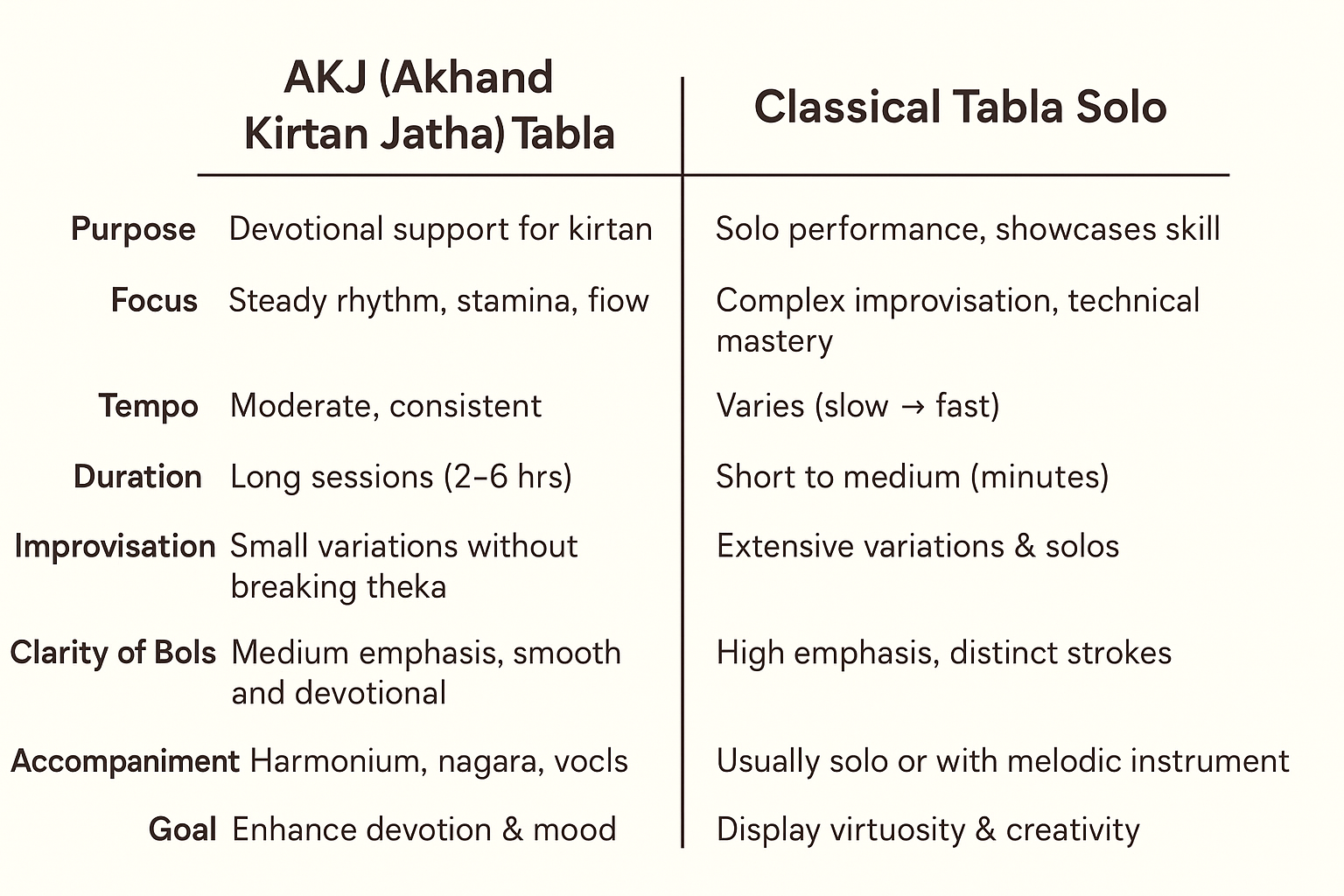
Tabla is an essential instrument in devotional music, especially in Akhand Kirtan Jatha (AKJ) sessions. The AKJ style of tabla is unique because it emphasizes continuous rhythm, supporting the kirtan singers, and maintaining energy for long hours. Unlike classical tabla solos, AKJ tabla focuses more on groove, clarity, and devotional feel rather than flashy improvisation.

Here’s a step-by-step guide on how to practice AKJ-style tabla:

1. Understand the Context

  • AKJ tabla is primarily used in devotional kirtan sessions, often alongside harmonium, nagara, and vocal singing.
  • The goal is to maintain a steady rhythm, enhancing the mood of the bhajan, without overpowering the singer.
  • Complexity is moderate, with an emphasis on stamina and smooth flow.

2. Learn Basic Thekas for Bhajan Talas

Some commonly used talas in AKJ kirtan include:

  • Keherwa (8 beats): Dha Ge Na Tin | Na Ka Dhin Na
  • Dadra (6 beats): Dha Dhi Na | Dha Tu Na
  • Teen Taal (16 beats): Occasionally for longer bhajans

Practice tip: Keep your playing steady, soft, and clear. Avoid overplaying.


3. Build Stamina

  • AKJ kirtans can last 2–6 hours, so stamina is key.
  • Start with 15–20 minutes of continuous playing and gradually increase to 1–2 hours.
  • Practice slow, medium, and fast tempos, but always maintain consistency and clarity.

4. Focus on Laya and Flow

  • Maintain a smooth and flowing rhythm throughout the kirtan.
  • Learn to gradually accelerate or decelerate without breaking the theka.
  • Subtle variations in bols (like Dha Dhin Na → Dha Ti Na) help keep the rhythm interesting and dynamic.

5. Improvisation Without Breaking Rhythm

  • AKJ tabla allows small improvisations during intros, outros, or pauses.
  • Simple variations include adding extra Dha/Na, swapping bols, or doing gentle rolls.
  • Always return to the main theka smoothly.

6. Listen and Play Along

  • Listen to live AKJ kirtan recordings to understand:
    • How tabla complements singers
    • How rhythm is maintained for long periods
    • How muted and resonant strokes highlight the mood
  • Play along to match energy, dynamics, and devotion.

7. Suggested Practice Routine

  1. Warm-up: 10 minutes of basic bols
  2. Theka Practice: 15–20 minutes in slow & medium tempo
  3. Continuous Play: 20–40 minutes focusing on stamina and flow
  4. Variations: 10–15 minutes of small improvisations
  5. Cool Down: Gentle play along recordings

Final Tips

  • Practice daily, even for short sessions, to build finger strength and endurance.
  • Keep your strokes resonant and clear, as clarity is the hallmark of AKJ tabla.
  • Enjoy the devotional process—playing tabla in kirtan is as much about spiritual connection as technical skill.